Find info about electronics prices, discounts, top deals in link, like US below.
Showing posts with label Windows XP. Show all posts

How to install android sdk ubuntu and windows


Actually I just wanted to give you a little tutorial or how to install android sdk on your pc or laptop with ubuntu os, but the same might as well install android sdk emulator on your computer or laptop pc with windows os like windows xp, windows 7, or Windows 8 as do almost the same and little disparate.

In android sdk we can use whatsapp application or WeChat on a computer with the help of this emulator android sdk installation, and if your computer is connected to the Internet then the android sdk emulator has been able to connect to the internet without any setting.
android sdk emulator ubuntu

* How to install android sdk emulator on ubuntu:


1. Install Java or OpenJDK on your ubuntu.

Open synaptic package manager or ubuntu software center and type "OpenJDK" without quotes then there will be available in accordance with the OpenJDK version of ubuntu 10.04 ubuntu instance it would appear OpenJDK 6 right-click and mark for install. Wait until the process is complete. To install openjdk-7 see here
In terminal :
#sudo apt-get install openjdk-6-jre

2. Download the Android SDK emulator here.

3. Extract the Android SDK has been downloaded into documents or anywhere up as needed :).

4. Open terminal by pressing CTRL + ALT + T or click Applications -> Accessories -> Terminal. Typing sudo su and enter your password.

5. Navigate your terminal to the android sdk folder. For example, if the Android SDK folder located in Documents then follow these steps:

  • cd Documents --> cd android-sdk-linux -- > cd tools --> ./android
  • So do not want typing like the above do as follows:

    - Open a terminal its way as the No. 4 typing "gedit ~ /. Bashrc" without the quotes and enter the text below at the very top and then save.
  • #AndroidDev PATH export PATH=${PATH}:/home/???/Documents/android-sdk-linux/tools export PATH=${PATH}:/home/???/Documents/android-sdk-linux/platform-tools
note:the name of the red "/ home /??? / Documents / android-sdk-linux / tools" and that the second is the folder where I store the android sdk. Adjust to the folder where you saved.- Still diteminal the following command "gedit / etc/udev/rules.d/51-android.rules" without quotes and input the text below ".

SUBSYSTEM=="usb", ATTRS{idVendor}=="0bb4", MODE="0666"

SUBSYSTEM=="usb", ATTRS{idVendor}=="0502", MODE="0666"

SUBSYSTEM=="usb", ATTRS{idVendor}=="12d1", MODE="0666"

SUBSYSTEM=="usb", ATTRS{idVendor}=="1004", MODE="0666"

SUBSYSTEM=="usb", ATTRS{idVendor}=="22b8", MODE="0666"

SUBSYSTEM=="usb", ATTRS{idVendor}=="04e8", MODE="0666"

SUBSYSTEM=="usb", ATTRS{idVendor}=="0fce", MODE="0666"

SUBSYSTEM=="usb", ATTRS{idVendor}=="0489", MODE="0666"

SUBSYSTEM=="usb", ATTRS{idVendor}=="18d1", SYMLINK+="android_adb", MODE="0666"

SUBSYSTEM=="usb", ATTRS{idVendor}=="04e8", MODE="0666", GROUP="plugdev"

To install the android sdk at the root can be viewed of the source ubuntu comunity here.

Then save and reboot or restart your laptop or computer. So that when you open the android sdk does not necessarily have to enter the android sdk folder on terminal. simply by opening a terminal and sudo password and then android sdk android in laptop or pc you'll leave.

6. Open a terminal and typing sudo ubuntu android then enter your password.

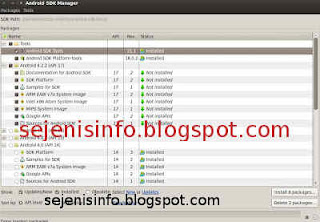
7. After the android SDK emulator appears and then select the check tools and android files that get installed like in the picture below.
android avd emulator ubuntu

In the picture above I did install android 4.2 version and you can choose the version that will be installed android as android ICS, android honeycomb etc as you wish. At the bottom of the Extras folder with writing a check Android support libraries, Google play service, Google usb driver and so adjust it with the needs.

8. Click the install packages and licenses accept check, wait a while until installation is complete.

9. After install android sdk on PC or laptop is complete then click the Tools button located at the top left after the packages.

10. After the new window appears select the window or click the Manage button AVDS ... and click the New button on the right existing, well here you can choose your favorite android version there is a 10 inch size to a small size, select the size of the 7-inch or 5 inch that if the computer or laptop has a less specs computer so you are not too hang up or heavy and lag.

11. A new window will appear when the button is clicked and a new Insert your name free android for example name is androidku, android select your choice according to size preference. If you want to change the size of the internal memory replace it from 200 to 512 for example, and the contents of sd card to 1024 = 1GB and click OK.

12. If it is then in view avd there will be a new menu that has been created is androidku. Click start to open its android os android will appear according to your choice.

* To install the Android SDK on windows is the same way.


1. Download and Install the java application here.

2. Android Download for windows here.

3. Install android sdk on windows and if it is open android sdk installed and did his manner as above at the start of No. 7.

Video how to install android sdk emulator on pc or laptop


Posted by: Zein Okeh Share Everything, Updated at: Monday, May 06, 2013

How to know windows version installed


Computer or laptop which already windows installed either windows xp, windows 7 or windows 8, perhaps we do not know which version of Windows that is used on our pc. There are many versions of windows like windows xp service pack 1, windows xp sp2 and also on windows xp sp3 there are several other versions as windows xp for gaming, windows xp media center, windows xp home edition, or windows with x32 or x64 bit etc..

If I could mention one by one until dawn :). Our PC has installed the windows being installed by others of course we do not know the most likely version is used, the following well below I will give a little info about how to know which version of Windows that is used in your computer or laptop.

How to know the version of windows on windows xp and windows 7:

In windows to know which version of Windows that is used almost same way, but not nearly but thats same way.

1. If its on the desktop or on the main screen there is icon my computer, just right click mouse on my computer icon and click properties that its.

2. If the My Computer icon on the main screen or on the desktop it does not exist then the way we use open windows explorer then right click the mouse and then click properties.
See the example image below.

how to know windows version


Display system properties windows xp deluxe version.
system properties windows


3. If you want to see the whole system including the use dxdiag version used then use the following:
- Click start and click run.
run button windows


- Typing "dxdiag" without quotes, then enter will be out the display as shown below.
dxdiag windows xp deluxe


For his appearance may vary slightly depending on the theme used.

How to know windows 8 version:
For an extra little info for those who may be new including my first time on using windows 8, may be will confused to looking for run and to run some command like cmd, dxdiag etc..Here a little info to find it:

1. Open windows explorer.
2. Right click mouse button and select Properties.

How to enter to run in Windows 8:

1. Move the mouse to the right monitor, will be out a menu.
windows 8 menu


2. Select the top menu the search menu and typing cmd.
windows 8 search command run dxdiag

If you want to open cmd as adminitrator just right click your on cmd icon and see on your screen below that will appear the options.


Posted by: Zein Okeh Share Everything, Updated at: Sunday, May 05, 2013

Cheap price Android jelly bean from asus


For those of you who are looking for android jellybean that's cheap and good quality asus ME172V might be a good choice for you.

After the success of the collaboration between Asus and Google with its nexus 7 asus now provide cheap android price but with good specs that 1GHz processor and Mali 400 GPU.
Asus google nexus 7, which previously has been launched with the operating system windows xp profesional tablet is very interesting too.

Indeed the price of asus ME172V is not expensive but the asus has not given news of her will be launched this asus ME172V, maybe the beginning of this new year. Results from GLBenchmark test that yields a low end tablet specs.
cheap asus tablet jellybean
image By vernieman on flickr.com

From the results GLBenchmark gives also the results that this Asus tablet is a tablet jellybean 4.1.1 with the resolution of 1024 x 522 even likely to increase to 1024 x 600.

The result of the specification is still known only very limited, other specifications as yet known about the core, sdcard slot or anything else related to this asus ME172V.
This news is a bit surprising addition will make a jellybean that cheap android tablet also will give employees a touch different for us who have funds that are not too large.

But unfortunately there has been no news tablet will launching, it's that we should be a little patient waiting for news of the emergence of the tablet.

Referensi : BeritaTeknologi

Posted by: Zein Okeh Share Everything, Updated at: Wednesday, December 05, 2012

Setup Dual boot windows 8 and windows xp


Setup dual boot windows 8 with windows xp is very easy to do, and if you want to dual boot with windows 7 can be done. But in this post I will discuss is to make dual boot windows xp and windows 8.

Windows 8 is the latest product of windows that can be used on tablet pc, which has a x86 and x64 systems and most likely Windows 8 can not be used on android tablet because they are different systems, the android system uses ARMv7  that can not be used to install windows 8, but you must use LIBSDL or Bochs, an app that makes it possible to run different operating systems like linux ubuntu on android, windows 98, windows xp etc..
windows boot manager
Here's how to set up a computer to dual boot between windows 8 and windows xp.

1. Create two partitions, the first drive: C for use windows xp and drive: D to use Windows 8. Minimal capacity to Drive: C is 10GB while the Drive: D 20GB.
2. After making two partitions, install windows xp first. Iinstall windows xp installation at Drive: C.
3. Furthermore, after installing windows xp do windows 8 installed on drive D.
4. Once both pieces of the operating system is installed, the boot will stay on windows 8.
5. In windows 8 do the settings for dual boot, by hover your mouse cursor to the right of your monitor which will display a widget to do the setting.
6. Click on Settings and then click Control Panel.
7. In the Control Panel window click System and Security, click System
8. On the left side of the window system, click on the fourth is Advanced system settings.
9. Once the window opens, click Settings in the Startup and Recoverry which will display a new window that there are two options in the Default operating system Operating system select Earlier Version of Windows and then click Ok.
dual boot windows xp and windows 8

10. Restart the computer, if it is successful then the first look at the computer at startup option menu will pop up a window to select Earlier Version of Windows and Windows 8, Earlier Version of Windows is the first operating system to install that is the windows xp.

May be useful

Posted by: Zein Okeh Share Everything, Updated at: Monday, November 05, 2012

Script Defender 1.03 to execute scripting files


AnalogX Script Defender or script Defender is a tool to counter script that can cause the operating system to be corrupted.
This script defender can be used for windows 7, windows xp, windows vista, windows server and more.
There are files that are likely to spread the virus through the script we do not know its form. Script  defender 1.03 can prevent execute the virus script into our computer.

Many ways to block/execute the spread of the virus can occur at any time, such as using antivirus that can be optimized, but usually there is a script virus spreader that can not be blocked by the antivirus, then you need to install AnalogX script defender on your computer, it is used sparingly use the manual. That way each script virus that resides on your computer can be blocked with this free software.
analogx script defender 1.03
image source : Blog Bontang

How can we do to installing the software just click the downloaded file is sdefeni.exe. After the installation is complete then run the script defender 1.03, you can go to the start menu.
If the program is on, then you perform the initial configuration, the initialization process useful programs installed intercepts  extension file.

Script can be blocked is files like extensions files ie VBS, VBE, JS, JSE, HTA, WSF, WSH, SHS and SHB.

In addition to the above files, you can perform additional settings or files that you want the execution of its existence by the way, include the type of extension will be blocked through a list of file extensions to intercept, if all the settings are in accordance with the wishes and all the file extensions are already in your list 've been able to run more by clicking the install button intercepts. If the AnalogX script defender will displays a pop-up and gives a message that the file extension successfully included in the list. Then click the OK button to remove the message and click done to solve it.

Then you do your job as usual, and if something happens, the script AnalogX 1:03 defender to give a message, it means there is contact or a script that will run on the list. But you can choose, if you want to run the script then you simply by pressing the execute button or if you do not want to run the script click the abort button. If the script is apparently the script file disguised as a secure script, there will be a suspension or you quit while your computer and script defender would give the message to execute or abort.
You can download Analogx Script Defender 1.03 here

Reference : Blog Bontang

Posted by: Zein Okeh Share Everything, Updated at: Friday, October 19, 2012

AVG free antivirus 2013 Download for windows xp


Free AVG Antivirus 2013 for windows xp, which can be downloaded for free on the official website. AVG anti-virus is very powerful to eradicate all viruses on laptops and computers, in addition to avast and avira, avg anti-virus is also very popular and very helpful in his role.

AVG free anti virus 2013 with the latest security features and a new look, for those who never use windows 8 (retro) may already be familiar with the look of it but those who have never been this will be a new thing. Menus are contained in this new look will be clearly displayed, in terms of appearance taken from the display windows 8 but with more soft and more simple. Not only the look of the new AVG free anti-virus 2013 is accompanied by a wide range of changes and improvements to increase the performance of previous versions, including the following:
AVG free antivirus 2013 download


1. Will be lighter in running AVG, because the memory usage on windows that have been reduced.
2. Security increased detection and better than 2012 version.
3. Improved detection of viruses with services or cloud-based file reputation technology.
4. Notifications more, for a low computer or less comfortable for the notification, then we could be set to be disabled. To do this go to the menu option> advanced setting.

Apart from the four features above, avg free antivirus is also equipped with many other features, such as WIFI Guard and modules Do not track, WIFI Guard is to help computer users to avoid wifi access points in the form of hackers, who can alert the user when the computer will have access to the network. While Do not track will give you information about advertising, web analytics and social buttons that appear on the Internet which provides options to block or be monitored by the script.

Features that are not developed like AVG Link scanner been replaced by AVG Secure Search, so when there is a choice to install avg antivirus search default to be installed security toolbar in your web browser. To ensure it is not installed before you install you can chooce your curent option, and another festures might not want to install you have to select each installation on avg antivirus is the main component.

The operating system can be used fatherly to install AVG Antivirus Free 2013 is Windows XP, Vista, 7 and Windows 8 (available also AVG Free Antivirus for Linux / FreeBSD). When downloaded from the link given main AVG website, will be directed to the download site CNET.com, which only provides online (web) installer is 4 MB, so we have to be online to be able to install this antivirus. Available free trial AVG Internet security 2013.
To Download Free AVG antivirus 2013 you can follow here

Reference : Blog Bontang

Posted by: Zein Okeh Share Everything, Updated at: Wednesday, October 17, 2012

Ways to securing your computer system from hacker


There are several factors that can lead to compromised securing of computer systems, among which the development of a virus that will cause the computer system to be failure.
And with the development of technology the world now use the computer as a communication to online banking, social networking and online shopping. For it is the easier of the hackers and crackers as spammers can attack anytime on your computer system.

Hackers can stolen our personal data such as emails and other important data. For that we need a few countermeasures in order to keep your computer system safe from hackers and crackers. Here are simple steps that you can do on your computer system.
Secure Computer
image source : Flickr.com
1. Important data such as personal information had to be backed up at any moment and store it separately from the computer you normally use to open the email, social network and online shopping.

2. For computers that are often used for internet browsing software to install a good firewall, so viruses, worms, malware, trojans and adware will be difficult to penetrate the wall.

3. Using the browser, you should always take a look at whether they are in a state of optimum safety as email settings to keep spammers.

4. Operating systems, software and web browser you use should be kept up to date, frequent updates to the third circuit, the point to make them thicker than hacker attacks etc.. For users of Windows OS update by visiting windowsupdate.microsoft.com and for users of office visit officeupdate.microsoft.com latest patches and updates from it.

5. Boot disk is important, then you create a boot disk on your computer using a usb drive, so if there is damage to your computer operating system you just open the first with a boot disk.

6. Install anti-virus and setting the automatic updates so that updates to anti-virus will always receive the new version.

7. Be careful to incoming email and you do not know, because if we open the email could happen that email is a virus spreader.

8. There are some programs of unknown origin, the program can be a funny story or a joke, It can contain a Trojan horse in it and if you spread to multiple computers like kekomuter friend trojan horse virus then it will attack the computer in question.

9. Always turn off your computer when not in use, so your computer will be free from attacks by hackers, because hackers now can not penetrate the dead computer.

10. File name extension must remain disabled, this is usually the windows operating system by default is set to hide file extensions.

Posted by: Zein Okeh Share Everything, Updated at: Thursday, September 27, 2012

Windows Media player Corrupted


Windows that had long been abandoned and we never maintenance, and we never check the files may have been corrupted like this one.

How do I fix the Windows Media player has corrupted? Maybe some people asking like that, if Windows Media player will be damaged. Windows Media player is a popular application is the default Windows application. Windows Media player is usually used to play a song or video in Windows. OK here's how to disable and repair the Windows Media player.

To disable the Windows Media Player follow these steps

- Click on the Start button and go to Control Panel
- Open the Sound and into the Playback tab
- Now double click on Speakers / Headphones and click on the tab enhancements
- Select the Disable all enhancements
- Click OK and finish

To fix it you can download and install Windows Media Player to the latest version. The damage usually occurs because there is an error in your windows registry.
Source / Reference : Blog Bontang

Posted by: Zein Okeh Share Everything, Updated at: Tuesday, August 14, 2012

How to optimize your ram computer or laptop


Lot of ways to optimize the ram on the computer or your laptop. There are applications that can speed up your computer in a way that is so easy.

One of them is RAMrush. RAMRush is a tool for management memory for windows. RAMRush can optimize memory usage on Windows Operating System and also free up RAM Physical, make your PC work faster.

This tool runs from the system tray. In addition to optimize memory, RAMRush size is very small and easy to use. RAMRush also be used to prevent system crashes, memory leaks and keep your computer running more efficiently.

With RAMRush you can see how the use of CPU and RAM Memory is running. And how to begin to optimize ram on the computer / laptop?, for begin to starting optimize you simply press on the option "Optimize Star" on the tool RUMRush. Or it could be with Hot key, this tool by default HotKey is Ctrl + ALT + O.

Ram optimizer rush tool

Key Features RAMRush

* Increases the system performance
* Increase the amount of available memory
* De fragment the physical memory system
* Recover Memory from Windows applications
* Remove memory leaks
* Prevent system crashes caused by memory problems
* Displays real-time data using the CPU and RAM
* Hotkey to perform optimization
* Click to perform optimization
* Quiet mode in the Windows tray
* Auto Optimize mode support
* Command line mode support (eg: 'PATHOFRAMRUSH / RAMRush.exe-AutoOptimize')

Supported on Windows 98, Windows ME, Windows 2000, Windows XP, Windows 2003, Windows Vista, Windows 2008 and Windows 7.

Download RAMrush here..

Reference : Dede Purnama

Posted by: Zein Okeh Share Everything, Updated at: Monday, August 13, 2012

What is igfxpers.exe


We may wonder about igfxpers.exe running on windows that we use it. igfxpers it runs automatically on windows and it takes a lot of resources of the computer system so that our computer becomes a bit disturbed his speed. Although this is a bit useless for our operating system but if it makes us a less than optimal computer we can turn it off and igfxpers.exe is not a virus or malware.
What is igfxpers.exe
image source : Dede purnama

What is igfxpers.exe? And How to Turn it off? What the heck is igfxpers.exe? Try to open the Task Manager, go to the Processes tab. After that note the Image Name. There was a process called igfxpers.exe running in the background. This file is the process of saving Intel chipset-based graphics card driver Intel. Igfxpers.exe commonly called the Intel Common User Interface that is useful on computers that will restore the original screen resolution after restart / shutdown / hibernate. If observed, this process takes a lot of computer system resources. Therefore, you should turn it off. Here's how:

1. Type "msconfig" in the start menu, without quotes.

2. Click the tab "Startup" and remove the check mark on the Intel Common User Interface.

3. Click the "OK".

4. Restart the computer to see the changes.
reference [Dede purnama]

Posted by: Zein Okeh Share Everything, Updated at: Friday, March 09, 2012

Task manager repair for windows


Did you ever experienced this "task manager has been disabled by your administrator" is caused by the viruses, malware, spyware has modified the existing regedit in your windows, as happened several times on my windows xp. At the moment I opened the task manager by clicking ctrl + alt + delete is happening is I was given an error message like this "task manager has been disabled by your administrator" when opening regedit and the message appears like this "Registry Editing Has Been Disabled By Your Administrator " this makes me very upset and made ​​me dizzy at the time.
task manager diable by administrator

After I was looking at some sites by searh engine I finally found some sites that discuss this issue.

There are several ways that they provide the solution:
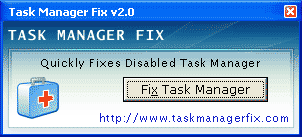
1. The easiest way you can do by using the task manager fix tool, Task Manager Fix is a FREEWARE system utility to fix task manager disabled by spywares, trojans and displays error message: "Task Manager has been disabled by your administrator", the which blocks access to Windows Task Manager.You can download it for free at here
task manager fix tool


2. Enable task manager via the run command. Click Start>Run and Paste the following  as it is and press Enter
REG add HKCU\Software\Microsoft\Windows\CurrentVersion\Policies\System /v  DisableTaskMgr  /t REG_DWORD  /d /0 /f.

3.  applying windows Group Policy Editor

  • Click Start button click Run and Type Gpedit.msc Navigate to User Configuration\Administrative Templates\System\Ctrl+Alt+Del Options\Remove Task Manger
  • Double Click Remove Task Manager and set it to Not Configured
4. By Using Registry Editor
  • Star Run and Type Regedit and Click o.k
  • Navigate to HKEY_CURRENT_USER\Software\Microsoft\Windows current Version\Policies\System
  • In the Right pane delete Value DisableTask mgr
  • Close Registry Editor. 
May the steps above work for windows xp, 7 and vista.
    reference [techdows]

    Posted by: Zein Okeh Share Everything, Updated at: Tuesday, February 14, 2012

    How to repair rundll32 error


    Your computer may have problems with rundll32.exe is error, using windows xp, windows 7 and vista could this happen often, especially for users of Windows 98 but I guess now rarely use windows 98. how to fix rundll32? before take up this let us know about the windows rundll32.exe in advance.
    windows system rundll32 error

    Rundll32.exe is part of Windows OS are responsible for running the DLL and put libraries in memory. Rundll32.exe process is known as a command line utility programs, and perform its function is integrated along with the rundll.exe file. Rundll32.exe works by applying a function exported from a specific DLL module is 16bit or-32-bit. Rundll32.exe is the process of development of the Run DLL.

    Rundll32.exe is a function of internal program used by Windows to run other programs that have not been known internally as a DLL (dynamic link libraries) are required by the operating system and your programs (eg Word, Outlook, Internet Explorer, OpenOffice, Thunderbird , Firefox, or whatever in order to function). Such programs are charged to the DLL into memory and under and then trigger certain functions from the DLL module.

    Why Rundll32.exe error?
    Rundll32.exe error on usually occurs in response to the inability to access Windows applications, programs or files as a result of a file (Dynamic Link Library) is damaged or lost or in response to the virus rundll32.exe designed to look like a Windows process which normal. Another cause of damage is due to rundll32 install and uninstall process is not so perfect that cause system crashes.

    How to fix Rundll32.exe Errors ?
    There are several ways that can be taken to repair this damage;

    A. Automated with software. An easy way to fix this is to use a software called RegCure Registry Cleaner. Unfortunately the software is paid and I think you will definitely avoid this.

    2. By manual means, ie by doing some remedial measures.

    3. If it is clogged, the last way is to install repair or install completely.

    How to Fix the "Windows Can not Find C: WindowsRundll32.exe" Error ?

    A. Sometimes when the rundll32.exe file is lost, corrupted or virus infected, you may get a message like this: "Windows can not find C: WindowsRundll32.exe. Make sure you typed the name entered correctly and try again ".

    2. First of all, scan your computer with a reliable antivirus program to get rid of any virus infection that might be found. However, if a file is missing or corrupted Rundll32.exe which is causing the problem, first try to find the rundll32.exe file in the folder C: windowssystem32dllcache. If it's still there, please copy and move them to the location C: Windowssystem32.

    3. If the dllcache folder does not exist, please look in C: WindowsSericePackFilesi386 and copy to the above is what I mean.

    If the 3 steps above still fails, do the following process;

    A. Insert the Windows installer disk into the CD / DVD ROM drive.
    2. Click [Start] and select [Run ...].
    3. Type: [expand f: i386rundll32.ex_ c: windowssystem32rundll32.exe] in the Run box was then press [Enter], then the copying process will run an
    4. After the 3 above is complete, reboot your computer and test results.
    5. Process is completed and the problem should be solved.

    Note:
    A. Sometimes when a virus infected file rundll32.exe, it would not shutdown computer. To fix is ​​you must delete the  rundll32 file is infected with a virus and then copy back of the cd installer.
    2. Should be completed after the second way above, then the problem goes away. But if for some reason is not well done, then it follows the path that can be taken is to install repair or installation of a total system operation.
    Reference [source]

    Posted by: Zein Okeh Share Everything, Updated at: Wednesday, February 08, 2012

    How to stop windows updates windows xp and vista


    When we use the internet with a slow speed connection that we should turn off automatic updates windows xp, vista etc, because it can be the cause of the speed of the Internet becomes more slow.

    Automatic updates will be downloading the latest system from Microsoft that the results will be installed into the Windows system. if we do not need it so we can disable the windows auto updates.

    how to stop windows update windows xp:
    1. Go to control panel.
    2. Double click in the system.
    3. Go to the Automatic updates tab.
    4. Chooce Turn  of automatic updates in the option.
    turn of automatic updates windows xp
    Image [source]

    how to turn of windows updates windows vista :
    how close to the windows xp we can see illustrated below
    turn of automatic windows updates windows vista
    Image [source]

    Posted by: Zein Okeh Share Everything, Updated at: Wednesday, February 01, 2012

    Change startup programs windows 7,xp,vista etc


    how to customize the startup programs windows 7, XP,vista etc. on this opportunity I tried to give a tips to remove windows startup programs, change windows start up programs or disable startup programs in windows 7, xp, vista etc.

    Many current applications or software that runs some of their components at any time the computer is turned on, whether the program is being used or not. These components will be incorporated into the Windows Startup so that they run every time you turn on your computer without your permission. All programs are consuming memory, CPU load time, and other resources and can significantly slow down or even make your system crash. To speed up your computer, you should disable or turn off unnecessary programs when the computer startup.


    How Can I Disable Programs From Windows Startup?
    There are many ways to prevent the program to not run at startup. Some common methods are listed below.

    Method 1: Configure Windows Startup Folder for Windows 95/98/Me/XP/Vista/7
    You may find some program shortcuts if you go to (Start - Programs - Startup) or (Start - All Programs - Startup). Program these shortcuts will run at startup. Just delete the shortcut that you do not want running at startup.
    startup program windows 98
    Image source : computer how to
    Right click the program you with to delete, and click delete
    - Win9x/98/Me – C:\Windows\Start Menu\Programs\StartUp
    - WinNT/2K – C:\Winnt\Profiles\All Users\Start Menu\Programs\StartUp
    - WinXP – C:\Documents and Settings\All Users\Start Menu\Programs\Startup

    Method 2: Using the System Configuration Utility (msconfig)
    The easiest way to access MSCONFIG is by going to "Start", then type msconfig (for windows 7 and Vista) For Windows XP (Start - RUN - MSCONFIG and then click enter).
    disable startup program windows 7,xp,vista

    Further Under the Startup tab there is a list of all programs that start in the Windows Registry. Simply uncheck the programs you do not want to startup when windows starts up. Once you make your selection, click Apply and Ok.

    Some startup programs may be important, such as antivirus and some programs that really work when the computer starts up. Reference[Dede purnama]

    Posted by: Zein Okeh Share Everything, Updated at: Tuesday, January 31, 2012

    ZenOK Free Antivirus 2012 Download


    The latest free anti-virus in 2012, namely zenOK, with this anti-virus you can more calmly when browsing on the internet because it has a 3 way with zenOK security solution. which means Save, monitor and protect the information That drive your future.
    free anti virus zenok 2012

    What is ZenOK?

    Backup. Sync. Share. Publish. Restore. Protect files. Data protection guaranteed up to $100.000 USD.
    Available on Windows, Mac, Linux, iPad, iPhone, Android, Blackberry.

    File Sharing is easy. Teamwork made easy while on the road.

    Big files? No problem. ZenOK Restore includes secure file-sharing that sends your friends and colleagues an email without attachments that contains a link to download files of any size. Optionally you can limit the time the file will be shared to one day or one week. This way you stay in complete control of the files you've shared with others.

    Protect what you love most. Back-it-up in Real Time.

    Protect your photos, music and documents against a hard drive crash, fire, flood and other risks.
    You erased a file accidentally? No problem, ZenOK includes a full automatic online backup with plenty of space to protect your irreplaceable files.

    Managing multi-user environment, schedule automatic backups, and monitor the health of your backups from the comfort of a single web-based admin console. Pay-as-you-go model saves time and money with no setup fee, no hardware to buy, and little management required.
    You can download zenOK antivirus 2012 here

    Posted by: Zein Okeh Share Everything, Updated at: Monday, January 16, 2012

    how to fix missing file DLL extensions


    As a computer user with operating system windows, there are times when the windows were containe by virus and wether we are always using the internet and often enter the flashdisk that might be exposed to the virus. With antivirus contained in our computers that do not have the ability to fix it.
    fixer missing files DLL

    So the operating system like windows xp, 7 and vista are susceptible to the virus because it has an antivirus that is not so good, it will cause some loss of extension files that are important to the windows as a DLL file extensions.
    The loss of some DLL files will cause the operating system unbalance and will cause some applications not working properly. This certainly will make us a little dizzy because the applications that we use can not we used.

    What does dll mean?

    Dynamic Link Library

    Why do my dll-files suddenly disappear?

    Dll-files are usually used by a lot of different programs. Then when you remove the program using an uninstall utility, it removes all files it installed during the installation progress and also the dll-files used by the program that are also used by other programs.

    To Fix Missing DLL file this we can use a tool or software that can fix this would problem. One tool that we can use with a DLL-files.com Fixer, this tool can Automatic fix DLL files error.

    Below are some benefits to be gained by using this tool:

    DLL-files.com Fixer Benefits

    • Optimize your registry with simplicity and ease.
    • Defrag your Windows® registry with one simple product..
    • Fix all your DLL file problems at once and maintain an error-free Windows registry.
    • Stop your applications and PC from crashing.
    • Prevent the unwanted popups from appearing over and over.
    • Improve PC performance and operating system response time.
    • Speed up operating system performance.
    • Repair and clean your registry of unwanted and invalid registry entries.

    How do I install the dll-file I've downloaded from DLL-files.com?

    Use an application to unzip the DLL file you download from DLL-files.com and extract it to your system directory. By default, this file is located here:
    • Windows® 95/98/Me: C:\Windows\System
    • Windows NT/2000: C:\WINNT\System32
    • Windows XP, Windows Vista, Windows 7: C:\Windows\System32
    If you use a 64-bit version of Windows, you should also place the file in C:\Windows\SysWOW64\
    The other option is to upload the DLL file directly to the program that is asking for the file. If this doesn’t immediately solve the problem, you may need to use regsvr32 by the following way:
    1. Open Windows Start menu and select "Run..."
    2. Type CMD and press Enter
    3. Type regsvr32 "filename".dll and press Enter
    Download tool here

    Posted by: Zein Okeh Share Everything, Updated at: Sunday, January 15, 2012

    Free hard disk recovery software for windows and linux


    Hard disk or commonly known as the hard drive is a device that is very important to us as computer users.
    With hard disk  all the important data we can keep it safe, but there are times when your hard disk will be damaged, either intentional or unintentional, such as hard drives in accident format, data is erased by others, or it could be our hard drives exposed to the virus so that important files are missing.

    So how recover data from hard disk? This is a thing that people often questioned! but not many people know the existence of free hard drive recovery software on the internet, those who do not want to try and just rely on a service place to do it. In fact we can do at home with software available that can be downloaded via the internet, such as the Free Data Recovery Software - EASEUS Data Recovery Wizard ®, software that can make the harddrive restore all the lost files, formatted and erased.

    free recovery hard drive software easus
    Free and easy-to-use data recovery software

    Free and powerful data recovery software to recover 1 GB data free of charge. It solves all data loss problems - recover files emptied from Recycle Bin, or lost due to software crash, formatted or damaged hard drive, virus attack, lost partition and other unknown reasons under Windows 2000/XP/2003/Vista/2008 R2 SP1/Windows 7 SP1. It recovers data from formatted partitions with original file names and storage paths. Moreover, the free data recovery software works well with dynamic disk, RAID and EXT2/EXT3 file system,  Recover deleted or lost files emptied from the Recycle Bin.
       

    Advantages over other free data recovery software:
    • Recover files from formatted partitions with original file names and storage paths.
    • Recover data from lost/deleted partitions.
    • Recover data from dynamic disks. 
    • Get back files after a partitioning error or hard disk crash
    • Get data back from RAW hard drives
    • Recover from hard drive, USB drive, memory card, memory stick, camera card, Zip, floppy disk or other storage media.
    • Recover from Linux file system under Windows.
    • Recover office document, photo, image, video, music, email, etc.
    You can visit the download site here

      Posted by: Zein Okeh Share Everything, Updated at: Thursday, January 12, 2012

      Forgot Windows XP Password ?


      Forgot Windows XP Password? Ways to Find Windows XP Password

      By Daphne Angel

      Question: I forgot my Windows XP Password and now I am locked out of my computer, is there any way to find My Windows XP-based computer cryptogram?

      Answer: Don't worry - if you forgot Windows XP password, there are many methods you can used to find a Windows XP-based computer cryptogram.

      Method 1: Try To Guess your forgotten Windows XP Password.

      Don't laugh! You'd be surprised how often this works. So, before you jump into any high tech windows password recovery solutions, try your hardest to remember what your forgotten cryptogram may have been. Most passwords, even complicated ones, are often tied to common things in our life, such as people, places and things in our personal and professional lives.

      Could your forgotten cryptogram have had anything to do with?

      1. Your name or the name of your friend or family member?
      2. Your birthday or your loved one's birthday?
      3. Your home or office address?
      4. Your lovely pet's name?
      5. Your favorite food?
      6. A frequently dialed telephone number?
      7. A combination of any of the above?

      Method 2: Use Your Windows Password Reset Disk
      Assuming you were proactive and created a password reset disk at some point in the past, use it at the XP logon screen to change your cryptogram. Your password reset disk will still work even if you've changed your Windows XP cryptogram since creating the disk. Follow these steps to reset the forgotten cryptogram.

      Step 1: Click use your password reset disk. The Password Reset Wizard starts. The Password Reset Wizard allows you to create a new password for your user account. Then click Next.

      Step 2: Insert your password reset disk into drive A, and then click Next.

      Step 3: Type a new code in the Type a new password box, then confirm the password. Click Next.

      Method 3: Have Another User Account With Administrator Privileges

      If you have other user accounts on your computer, one of them may be setup with administrator level access. This means that you can log on with this account to change your forgotten cryptogram.

      Method 4: Hack Your Windows XP Account With Windows Password Recovery Program

      If you still can't find your forgotten XP password from the above methods, then it's time to try something a bit more technical. password recovery tools are software programs designed to recover or reset a lost/forgotten Windows password. They are considered as the best password recovery solution. Here take Windows Password Recovery 6.0 as example.

      You can find forgotten XP password with 3 easy steps:
      Step 1: Download and install Windows Password Recovery 6.0

      Step 2: Burn windows password recovery 6.0 to CD/DVD or USB Flash Drive

      Step 3: Reset your forgotten cryptogram

      Method 5: Still Can't Find Your forgotten XP Password?

      If you still can't find your forgotten XP password, even after using the Windows password recovery programs linked above, you will need to perform a clean install of Windows system which will erase everything on your PC.
      Related Articles: http://recoverlostpassword.com/article/forgot-windows-xp-password.html
      If you forgot Windows XP password, there are many methods you can used to find a forgotten Windows XP password.

      Article Source: http://EzineArticles.com/?expert=Daphne_Angel
      http://EzineArticles.com/?Forgot-Windows-XP-Password?-Ways-to-Find-Windows-XP-Password&id=6017954

      Posted by: Zein Okeh Share Everything, Updated at: Wednesday, December 21, 2011

      Cheat solitaire game windows xp


      This time I tried to share solitaire game cheat codes from Windows XP. because I'm confused to find ingredients recent posts so I just share this one, for increase the number of my blog posts.

      Indeed slightly cheating anyway but this is just for fun, because we often feel annoyed with this game of solitaire games often fail and rarely successful, then it's a bit of cheating is it's okay. .. :)

      Classic solitaire game is the default windows games. Typically each time you install Windows onto your computer, then automatically this card game can be a bonus.

      This code is only valid if you play Solitaire game with the option open 3 cards (Draw three), sometimes you need a second or third card, but can not be taken to bring it up one by one. So make it easier for you to win.
      See the picture below.

      solitaire games cheat

      Steps you have to do is
      1. Press the "Ctrl + Alt + Shift", and click the mouse to open the card (combination of keys and mouse clicks together)
      2. Cards will open one on one though optionnya 3 cards.
      solitaire games windows xp cheat

      solitaire game download windows xp Here

      reference : Artikelkomputer

      Posted by: Zein Okeh Share Everything, Updated at: Monday, November 21, 2011

      Windows blue screen error messages


      Sometimes errors generated on the computer often happens when we are not careful in using it, whether it be when we install the wrong driver or install new hardware. Like Blue Screen Error Messages, this error messages usually contain a mistake on the operating system or hardware.

      Contains troubleshooting advice or suggestions what to do to correct the error. It lies under the error message.

      Hexadecimal codes that wrote the code crashes.

      Memory Dump Message: indicates that all the processes that are currently being held in memory is copied into a file on disk for the purpose of debugging. This debugging file usually takes the technicians to analyze and correct errors.

      In this discussion we will only discuss the meaning of the main error messages contained in the Blue Screen, how to fix blue screen on windows below.
      Imgae source : en.wikipedia.org
      Code:
      1. IRQL_NOT_LESS_OR_EQUAL (0X0000000A).
      This is a mistake that commonly occur in the Blue Screen error, this message that appears most frequently. This error message is caused generally, due to a mismatch driver installed on your computer.

      List of Causes:
      ? Problem drivers are not compatible or incompatible
      ? Video Card problem, this includes the overclocked video card that exceeds the limit or you just changed your Video card and Video card not uninstalling the old drivers from the chipset is different
      ? Problems Audio Card, including configuration errors or bugs in the sound card drivers

      2. NTFS_FILE_SYSTEM atau FAT_FILE_SYSTEM (0X00000024) atau (0X00000023).

      This message gives an overview on where the damage is located, ie in the partition or filesystem but not in HD. We can check by check cable PATA or SATA or we can check the partition with chkdsk tool.

      3. UNEXPECTED_KERNEL_MODE_TRAP (0X0000007F).

      This windows blue screen can be caused by:
      ? Hardware Overclock excessive
      ? An overheated computer components
      ? BIOS is corrupt
      ? Memory and CPU is disabled

      4. DATA_BUS_ERROR.

      This blue screen error codes messages is caused because of the possibility that memory or the memory slot on the motherboard is damaged.

      5. PAGE_FAULT_IN_NONPAGED_AREA.

      This error messages windows Due to hardware damage, including main memory, video card memory, or memory in the processor (L2 Cache).

      6. INACCESSIBLE_BOOT_DEVICE.

      Caused due to an error in the configuration jumpers the wrong hard drive, boot sector virus, the wrong IDE controller drivers, or chipset driver error, to stop a blue screen we can check it.

      7. VIDEO_DRIVER_INIT_FAILURE.

      To fix a blue screen error messages you try to install the right video card driver. The error occurs on the video card driver installation is less than perfect, restart during installation or can also occur because of errors in the installation of the driver.

      8. BAD_POOL_CALLER.

      In windows blue screen This error can occur because of errors or incompatible drivers. Often occurs when installing windows XP from an upgrade, or not from the new installation.

      9. PEN_LIST_CORRUPT.

      This message is caused due to damage RAM.

      10. MACHINE_CHECK_EXCEPTION.

      Caused by a defect in the CPU, or the aggressively overclocked, and power supply shortage of power or damaged.
      source : http://www.info-technology.tk

      Posted by: Zein Okeh Share Everything, Updated at: Saturday, November 05, 2011
      Related Posts Plugin for WordPress, Blogger...
      Powered by Blogger.