Tuesday, April 16, 2013
 Zein Okeh

Photoshop is a tool or application to edit our pictures to make the picture better and more in line with what we would expect, is a tool that does what is necessary for us as a photographer, although not a photographer but an amateur using photoshop can make the picture better. Photoshop is a tool that can be used in computers can also be used on android however photoshop for android, photoshop version is slightly different from the computer, editing tools become more simple and simple alias, his name is Adobe photoshop express.
Adobe Photoshop Express is a tool or android apps to edit photos easily run you can feel yourself.
Photoshop for Android is easier to use after we install android into us, then we run the photoshop express, and will be out the photos of us who are in the camera folder.
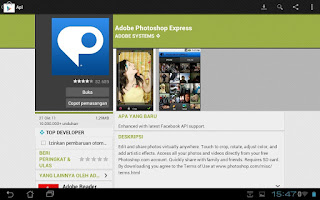
2. Once installed run photoshop express on your android and then there will be found your photos that are in the camera folder in android.
3. Select an image to be edited by clicking on the photo.
4. After the selected photo and click open image such as stripes and click edit photos, can be seen an example in the image below:

photoshop settings in android
5. Began to edit our photos in photoshop android, top right side we can see the button to edit photos, ranging from the right to the left side of the first to give a special effect given by photoshop and also to provide border so we will look gorgeous photo:
with photoshop edit photo in android

6. The second is to provide the soft focus on our pictures to be edited so that the image can be seen clearly:

editing photos in android
7. Then the third part of the right button is the key to providing better color, and brithnes which will be more visible light.
exposure photos on android

8. The last button the first button from the left or the fourth from the right is a button to crop the image, rotate and reverse straighten photos.
9. Once completed in the edit do not forget to save the photo, to save photos can click the button below the bottom right can see the image below:
save photoshop edit photo from android

10. To upload to facebook or twitter can click the button lines on the android task bar and click the upload button :
upload photos to facebook in android

Adobe photoshop express it as the name suggests editing the quick and easy way. But for those of you who are not so fond of photoshop express and want to edit it even better you can use the touch photoshop, but photoshop is paid can be found here
Adobe Photoshop Express is a tool or android apps to edit photos easily run you can feel yourself.
Photoshop for Android is easier to use after we install android into us, then we run the photoshop express, and will be out the photos of us who are in the camera folder.
photoshop express android

Step how to edit photos in photoshop express android conducted in:
1. Install Photoshop express, can be opened in the google play here. Or you can download by search google.2. Once installed run photoshop express on your android and then there will be found your photos that are in the camera folder in android.
3. Select an image to be edited by clicking on the photo.
4. After the selected photo and click open image such as stripes and click edit photos, can be seen an example in the image below:
photoshop settings in android
5. Began to edit our photos in photoshop android, top right side we can see the button to edit photos, ranging from the right to the left side of the first to give a special effect given by photoshop and also to provide border so we will look gorgeous photo:
with photoshop edit photo in android
6. The second is to provide the soft focus on our pictures to be edited so that the image can be seen clearly:
editing photos in android
7. Then the third part of the right button is the key to providing better color, and brithnes which will be more visible light.
exposure photos on android
8. The last button the first button from the left or the fourth from the right is a button to crop the image, rotate and reverse straighten photos.
9. Once completed in the edit do not forget to save the photo, to save photos can click the button below the bottom right can see the image below:
save photoshop edit photo from android
10. To upload to facebook or twitter can click the button lines on the android task bar and click the upload button :
upload photos to facebook in android
Adobe photoshop express it as the name suggests editing the quick and easy way. But for those of you who are not so fond of photoshop express and want to edit it even better you can use the touch photoshop, but photoshop is paid can be found here
 Posted in: