Find info about electronics prices, discounts, top deals in link, like US below.
Showing posts with label Tutorial. Show all posts

How to install android sdk ubuntu and windows


Actually I just wanted to give you a little tutorial or how to install android sdk on your pc or laptop with ubuntu os, but the same might as well install android sdk emulator on your computer or laptop pc with windows os like windows xp, windows 7, or Windows 8 as do almost the same and little disparate.

In android sdk we can use whatsapp application or WeChat on a computer with the help of this emulator android sdk installation, and if your computer is connected to the Internet then the android sdk emulator has been able to connect to the internet without any setting.
android sdk emulator ubuntu

* How to install android sdk emulator on ubuntu:


1. Install Java or OpenJDK on your ubuntu.

Open synaptic package manager or ubuntu software center and type "OpenJDK" without quotes then there will be available in accordance with the OpenJDK version of ubuntu 10.04 ubuntu instance it would appear OpenJDK 6 right-click and mark for install. Wait until the process is complete. To install openjdk-7 see here
In terminal :
#sudo apt-get install openjdk-6-jre

2. Download the Android SDK emulator here.

3. Extract the Android SDK has been downloaded into documents or anywhere up as needed :).

4. Open terminal by pressing CTRL + ALT + T or click Applications -> Accessories -> Terminal. Typing sudo su and enter your password.

5. Navigate your terminal to the android sdk folder. For example, if the Android SDK folder located in Documents then follow these steps:

  • cd Documents --> cd android-sdk-linux -- > cd tools --> ./android
  • So do not want typing like the above do as follows:

    - Open a terminal its way as the No. 4 typing "gedit ~ /. Bashrc" without the quotes and enter the text below at the very top and then save.
  • #AndroidDev PATH export PATH=${PATH}:/home/???/Documents/android-sdk-linux/tools export PATH=${PATH}:/home/???/Documents/android-sdk-linux/platform-tools
note:the name of the red "/ home /??? / Documents / android-sdk-linux / tools" and that the second is the folder where I store the android sdk. Adjust to the folder where you saved.- Still diteminal the following command "gedit / etc/udev/rules.d/51-android.rules" without quotes and input the text below ".

SUBSYSTEM=="usb", ATTRS{idVendor}=="0bb4", MODE="0666"

SUBSYSTEM=="usb", ATTRS{idVendor}=="0502", MODE="0666"

SUBSYSTEM=="usb", ATTRS{idVendor}=="12d1", MODE="0666"

SUBSYSTEM=="usb", ATTRS{idVendor}=="1004", MODE="0666"

SUBSYSTEM=="usb", ATTRS{idVendor}=="22b8", MODE="0666"

SUBSYSTEM=="usb", ATTRS{idVendor}=="04e8", MODE="0666"

SUBSYSTEM=="usb", ATTRS{idVendor}=="0fce", MODE="0666"

SUBSYSTEM=="usb", ATTRS{idVendor}=="0489", MODE="0666"

SUBSYSTEM=="usb", ATTRS{idVendor}=="18d1", SYMLINK+="android_adb", MODE="0666"

SUBSYSTEM=="usb", ATTRS{idVendor}=="04e8", MODE="0666", GROUP="plugdev"

To install the android sdk at the root can be viewed of the source ubuntu comunity here.

Then save and reboot or restart your laptop or computer. So that when you open the android sdk does not necessarily have to enter the android sdk folder on terminal. simply by opening a terminal and sudo password and then android sdk android in laptop or pc you'll leave.

6. Open a terminal and typing sudo ubuntu android then enter your password.

7. After the android SDK emulator appears and then select the check tools and android files that get installed like in the picture below.
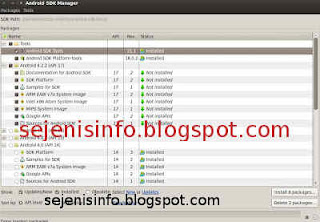
android avd emulator ubuntu

In the picture above I did install android 4.2 version and you can choose the version that will be installed android as android ICS, android honeycomb etc as you wish. At the bottom of the Extras folder with writing a check Android support libraries, Google play service, Google usb driver and so adjust it with the needs.

8. Click the install packages and licenses accept check, wait a while until installation is complete.

9. After install android sdk on PC or laptop is complete then click the Tools button located at the top left after the packages.

10. After the new window appears select the window or click the Manage button AVDS ... and click the New button on the right existing, well here you can choose your favorite android version there is a 10 inch size to a small size, select the size of the 7-inch or 5 inch that if the computer or laptop has a less specs computer so you are not too hang up or heavy and lag.

11. A new window will appear when the button is clicked and a new Insert your name free android for example name is androidku, android select your choice according to size preference. If you want to change the size of the internal memory replace it from 200 to 512 for example, and the contents of sd card to 1024 = 1GB and click OK.

12. If it is then in view avd there will be a new menu that has been created is androidku. Click start to open its android os android will appear according to your choice.

* To install the Android SDK on windows is the same way.


1. Download and Install the java application here.

2. Android Download for windows here.

3. Install android sdk on windows and if it is open android sdk installed and did his manner as above at the start of No. 7.

Video how to install android sdk emulator on pc or laptop


Posted by: Zein Okeh Share Everything, Updated at: Monday, May 06, 2013

How to know windows version installed


Computer or laptop which already windows installed either windows xp, windows 7 or windows 8, perhaps we do not know which version of Windows that is used on our pc. There are many versions of windows like windows xp service pack 1, windows xp sp2 and also on windows xp sp3 there are several other versions as windows xp for gaming, windows xp media center, windows xp home edition, or windows with x32 or x64 bit etc..

If I could mention one by one until dawn :). Our PC has installed the windows being installed by others of course we do not know the most likely version is used, the following well below I will give a little info about how to know which version of Windows that is used in your computer or laptop.

How to know the version of windows on windows xp and windows 7:

In windows to know which version of Windows that is used almost same way, but not nearly but thats same way.

1. If its on the desktop or on the main screen there is icon my computer, just right click mouse on my computer icon and click properties that its.

2. If the My Computer icon on the main screen or on the desktop it does not exist then the way we use open windows explorer then right click the mouse and then click properties.
See the example image below.

how to know windows version


Display system properties windows xp deluxe version.
system properties windows


3. If you want to see the whole system including the use dxdiag version used then use the following:
- Click start and click run.
run button windows


- Typing "dxdiag" without quotes, then enter will be out the display as shown below.
dxdiag windows xp deluxe


For his appearance may vary slightly depending on the theme used.

How to know windows 8 version:
For an extra little info for those who may be new including my first time on using windows 8, may be will confused to looking for run and to run some command like cmd, dxdiag etc..Here a little info to find it:

1. Open windows explorer.
2. Right click mouse button and select Properties.

How to enter to run in Windows 8:

1. Move the mouse to the right monitor, will be out a menu.
windows 8 menu


2. Select the top menu the search menu and typing cmd.
windows 8 search command run dxdiag

If you want to open cmd as adminitrator just right click your on cmd icon and see on your screen below that will appear the options.


Posted by: Zein Okeh Share Everything, Updated at: Sunday, May 05, 2013

How to hide file in android apps


There are some important files and folders in a gadget like android, laptops and mobile phones as well as several other gadgets, allowing others to access the confidential files or files that others should not know it could be used either intentionally or unintentionally. What more if we use android which is often used by others as a friend, brother, sister and others. For that we need to hide files and folders is as safe as possible so that important files such as music, song, video, and files and folders will be maintained and can not be found by others.

So the question now is, how to hide files in android?, Now it is in fact not a difficult thing to do because in google play alone there are some android apps to hide video files, songs and other files easily.

My choice to hide files application in android are two android applications use very easy and also free to be downloaded Adao file manager and  File hide expert.

How to hide files in android with Adao File manager:

1. Download and install Adao file manager. But this apk on google play is not available, can be found in several forums and others.

2. Besides could to hide file and foler in android, Adao file manager also can be used for the file manager as a tool to open the folder, data on android, if in windows, Adao file manager similar to Windows Explorer. Back up the application, task manager etc..

3. After installed, open Adao file manager application, select the SD card and select the data or files will be hidden by tapping the file until it comes out and sliding up the options menu so that the menu option Hide files visible. File hide option menu picture is at the bottom.
hide file di android

4. After the file menu Hide seen just click the options menu and any files that will be hidden will disappear from menu.

5. To restore files that have been hidden, Close Adao file manager or back by clicking the back button so Adao file manager located in the main menu. There are several menu options upward shift so posts will be hidden files visible. Click the Hidden files or writing for the first time we are given to create your own password, enter the password that will be made, after the password is created and has been entered into the Hidden files and files that are hidden will be there, click on the file to be restored to the original place of a single click or click longer.
restore file on android hide

How to hide files and folders in android with File Hide  Expert:


1. Download and install File Hide expert here.

2. Once installed open the app and to hide files such as video, song or music, pictures and also click the folder or picture folders that reside on the top right.
hide files on android
3. Select the folder or file that will be hidden by clicking the plus button on the right.
hide expert android files

4. Once files or folders are on the menu hide, click the hide button to hide all files or folders, these are available at the bottom left. And to restore the files and folders in hide just click the unhide all button or click the x button.
hide folder on android

5. Good luck.


Posted by: Zein Okeh Share Everything, Updated at: Wednesday, May 01, 2013

Screen capture for android with or without apps


Starting from the question in accusing me of someone who has the android phone "How do I capture picture on android?" Then I told screenshots android app? that same question with differend woords :) its kind that is a question when it was still new on using that android and not yet one week using android phone, in fact initially I also do not know how do it! :).

But since the Internet is now easier then I was open an internet in my room and searching in google, there are many applications that are in the google search, there could be no need to use the application and without root and there is also to make screen shot or screen capture applications need application and root. It still depends on the choice of you which is the best to use.

Also happened to be at that time I found a blog that I forgot to mention that blog and I'm sorry for him to posting back taht knowledge in my blog, way without the screenshot application on android i use samsung galaxy young. Ow much of a coincidence, is not really a coincidence everything is set up. The first I gave a screen capture images in a way that no android apps.

* How to Screenshot image without android application and without root on samsung galaxy Y GT S5360.


1. Take your phone and turn on:).
2. Screen is ready to be shot and then press a button on the center continues to press the back button on the the right once, the last push button on / of phone one and the picture will be soon in capture or in print to the screenshots folder.

screenshot image on android


3. To know the results open the gallery and see the screenshots folder there are the results.

* How to screenshot or capture an image in android with the application:

There are some screen shots android apk free or paid which are in google play we can choose according to our choice and according to your needs.

1. No Root Screenshot It, android screen capture application which is paid but its use does not need to root our android phone so it can be directly used.
2. Ultimate screenshots made ​​by Ice Cold Apps. Screen capture apps for android that there are two options one could with root and does not require root.
3. Screenshot by Kastor Soft, after I try and I read before installing android on phone we've had rooted. Though we can save the results of his capture to image JPG, BITMAP or PNG.
4. Screenshot Free By Wise Shark Software, this one I have not tried.

Posted by: Zein Okeh Share Everything, Updated at: Wednesday, April 24, 2013

Photoshop for android apk download


Photoshop is a tool or application to edit our pictures to make the picture better and more in line with what we would expect, is a tool that does what is necessary for us as a photographer, although not a photographer but an amateur using photoshop can make the picture better. Photoshop is a tool that can be used in computers can also be used on android however photoshop for android, photoshop version is slightly different from the computer, editing tools become more simple and simple alias, his name is Adobe photoshop express.

Adobe Photoshop Express is a tool or android apps to edit photos easily run you can feel yourself.
Photoshop for Android is easier to use after we install android into us, then we run the photoshop express, and will be out the photos of us who are in the camera folder.

photoshop express android

photoshop for android

Step how to edit photos in photoshop express android conducted in:

1. Install Photoshop express, can be opened in the google play here. Or you can download by search google.
2. Once installed run photoshop express on your android and then there will be found your photos that are in the camera folder in android.
3. Select an image to be edited by clicking on the photo.
4. After the selected photo and click open image such as stripes and click edit photos, can be seen an example in the image below:
edit photo with photoshop android
photoshop settings in android
5. Began to edit our photos in photoshop android, top right side we can see the button to edit photos, ranging from the right to the left side of the first to give a special effect given by photoshop and also to provide border so we will look gorgeous photo:
with photoshop edit photo in android
photoshop for android make easy
6. The second is to provide the soft focus on our pictures to be edited so that the image can be seen clearly:
soft focus photo shop android
editing photos in android

7. Then the third part of the right button is the key to providing better color, and brithnes which will be more visible light.
exposure photos on android
exposure photoshop android

8. The last button the first button from the left or the fourth from the right is a button to crop the image, rotate and reverse straighten photos.

9. Once completed in the edit do not forget to save the photo, to save photos can click the button below the bottom right can see the image below:
save photoshop edit photo from android
photshop  save tablet
10. To upload to facebook or twitter can click the button lines on the android task bar and click the upload button :
upload photos to facebook in android
upload photo to facebook
Adobe photoshop express it as the name suggests editing the quick and easy way. But for those of you who are not so fond of photoshop express and want to edit it even better you can use the touch photoshop, but photoshop is paid can be found here


Posted by: Zein Okeh Share Everything, Updated at: Tuesday, April 16, 2013

Windows 8 and windows 7 dual boot system


Around a couple of days ago my sister bought a samsung notebook with AMD A6-4400M APU Radeon (tm) HD graphics 2.70 GHz and 2 GB ram. That's just the information I used to create a dual boot windows 7 and windows 8 on the samsung laptop.

And before that I had made a post on how to dual boot windows 8 and windows xp on the pc, and dual boot or triple boot between windows, ubuntu linux and android. Whatever can be done on a computer or laptop that we have provided a laptop or pc we already meet the criteria or have the specs required for an operating system.

How to install dual boot windows 7 and windows 8 there are some things that need attention or need her to know some of the steps that must be done first. In samsung Laptop AMD A6-4400M vision the first thing change bios settings by clicking the F2 key when the laptop first time it runs, and then select the first boot the system it is cdrom first boot. Usually there are cdrom his name but I forgot the name of cd-romnya, because now the laptop was taken by my sister :).
dual boot windows 7 and windows 8

The first step to dual boot windows 7 and windows 8 are:


1. Make a partition on the hard drive, because its a new laptop so I created three partitions ie Drive C or the first partition is 100 GB,  drive D or a second partition around 50GB and for the rest Drive E for storage of data such as music files, video etc..
For the hard drive is already partitioned or already installed windows to make sure the partition is windows 8 windows 7 minimal  15G.
To create partition with  partition wizard tool see the video below :
2. Once the partition is created it is time to install the windows. First time that must be installed on your pc or laptop is windows 7, but it is okay if you want to install Windows 8 first and write cd key or serial number windows 7 to a paper for later needed during installation, enter into the windows 7 cd into cd-rom then restart your PC or laptop and then on the computer screen or laptop turns while press the F11 key to bring up the boot options of the first instance for the first boot drive and a second boot to cd-rom, now that we chose is the second boot is to boot to cdrom, but on some computers or laptops are different settings so if F11 can not work try by pressing F9 or F10 or F12. Or if the cd rom on your computer or laptop is damaged then it can do the installation of windows 7 on usb drive, to make a boot usb drive windows 7 can be found here.
3. If you've booted into the cd-rom then install windows 7 will run immediately and follow the steps according to instructions there. But to partition or select the appropriate partition we created earlier as the partition or drive C then select the partition, my advice would select the first partition or drive C to perform the installation windows 7, when the first partition or drive C: is for megabytes eg 100 MB or 200 MB and more, then select Drive D: a magnitude of more than 15 GB, the partition size of 100 or 200 mb and size assortment but I know size is not more than 500 MB is for the system partition or boot partition windows reverse the will be used for booting.
4. Once Windows 7 is installed on your computer or laptop, then the next ketahap.
5. Insert the CD or usb windows 8 restart your laptop or computer, as usual at the start screen appears click or press the F9 can boot, F10, F11 or F12 depending on your PC settings.
6. Once the PC or laptop is booting to the cdrom windows 8 and then select the appropriate languange and select the U.S. keyboard click next and install, well for its partition select the partition you created for Windows 8, for example Windows 7 installed on Drive C then windows 8 in installed on drive D. click next and the installation will begin just follow the steps in accordance with the instructions given there.
7. Once Windows 8 is installed it after restarting the computer or laptop then there are two choices aka boot the windows 7 and windows 8.
8. Good luck.

If you still get confused comments below this post. Thank you.


Posted by: Zein Okeh Share Everything, Updated at: Monday, February 18, 2013

Triple boot windows 8 ubuntu and android x86


Actually I have long time wanted to post how to create a triple boot between windows 8, ubuntu linux and android x86. How to dual boot or triple boot you can wear is in fact not a difficult thing you can do on your computer properly. But here I give to already know the operating system installer. And if you want to create dual booting between windows 8 and windows xp can be seen here how to dual boot windows 8 and windows xp.
triple boot operating system

Here are the steps to make your computer can use windows 8, ubuntu and android:

1. Create a partition into several sections, for windows 8 and android can be united without change, but for ubuntu to be installed on a separate partition.

Note: to install ubuntu operating system used capacity is about 3.5 gb for windows 8 about 10gb more and for android approximately 600MB. But you have to make partition more than that due in part to install multiple applications required.

2. Download the required operating system all for free.

  • Windows 8 download here
  • Linux ubuntu 12:10 here
  • Android x86 here

But I use windows 8 in different version from being downloaded, or if you already have all three of its operating system straight into the next step.

3. For the first I install Windows 8 into pc / computer with no cd or usb flash drive, if you have a cd install windows 8 with cd and can directly to the second drive, or drive D or you can install it to the first drive or drive C:. Follow all the steps involved when installing windows 8. Once the installation is finished and completed all the configuration settings, perform the next step.

4. Restart the computer and install ubuntu on drive C or drive the first or whatever drive do you want install it, for those who ever install ubuntu may be very easy, configure the settings as needed, then there'll will get some choice about windows 8 documents to import data into ubuntu, if you want to import data please tick the box parts, if not leave it blank.

5. When you have finished making install ubuntu, reboot then at the first look at boot grub2 there will be display for you to choose a system that will be used. If Windows 8 does not exist on the options add in grub2.

Go to the terminal and type the following command:
sudo gedit / boot / grub / grub.cfg "enter"
Search # # # END / etc/grub.d/30_os-prober # # # Copy and paste the text below before writing the above. or just add this below ubuntu OS

### BEGIN /etc/grub.d/30_os-prober ###
menuentry "Windows 8 Recovery Environment (loader) (on /dev/sda6)" --class windows --class os {
insmod part_msdos insmod ntfs set root='(hd0,msdos6)' search --no-floppy --fs-uuid --set=root AEC2F742C2F70D79 drivemap -s (hd0) ${root} chainloader +1
}


Edit the red text (hd0, msdos6) according to the partition windows is installed. eg windows 8 installed on partition 2 then replace with (hd0, msdos2).


6. The next step involves installing android-x86 on pc or computer.

  • Burn Android-x86 iso that has been downloaded into the hard drive or usb.
  • Restart the computer go into bios to press the delete key or F2. select the bios setting and select the first boot to usb, Save and restart, or in some cpu available directly from the keyboard to select click F9 or F11 to select the boot menu when the computer restart.
  • The first boot will look like this:
  • install android in pc booting
  • Select the bottom part of the install android
  • Select the partition to be used
  • partition android in pc
  • If you want to format the partition on the hard drive then select the format specified in accordance with the wishes of existing ext3, ext2, ntfs and fat32 and data will be lost on that partition. If you don't want formatted it's okay.
  • android in pc
  • Choose skip to not install grub.
  • grub in android pc
  • In this section select yes.
  • android in computer
  • Installation is running.
  • install android in pc
  • After the installation can choose to run android directly or reboot first.

If after the restart there was no option to enter the boot menu to android then go into ubuntu and open the terminal. Add text below into grub2 by typing "gedit / boot / grub / grub.cfg" interminal without quotes.

menuentry "Android-x86 4.0 RC2" - class android - class linux - class os {
set root = '(hd0, 7)'
linux / android-4.0-RC2/kernel root /dev/ram0 androidboot.hardware=eeepc quiet vga=788 dpi=120 i915.powersave i915downclock=1=1=2 usbcore.autosuspend SRC=/ android-4.0-RC2 /
initrd /android-4.0-RC2/initrd.img
}

menuentry "Android-x86 4.0 RC2 debug mode" - class android - class linux - class os {
set root = '(hd0, 7)'
linux / android-4.0-RC2/kernel root=/dev/ram0 androidboot.hardware=eeepc quiet vga=788 dpi=120 i915.powersave i915downclock=1=1=2usbcore.autosuspend SRC=/android-4.0-RC2 /
initrd /android-4.0-RC2/initrd.img
}

replace hd0, 7 with partitions are used as partitions if android OS used is sda3 then replace with hd0, 3.

If you're still confused can comment below.


Posted by: Zein Okeh Share Everything, Updated at: Tuesday, December 04, 2012

Setup Dual boot windows 8 and windows xp


Setup dual boot windows 8 with windows xp is very easy to do, and if you want to dual boot with windows 7 can be done. But in this post I will discuss is to make dual boot windows xp and windows 8.

Windows 8 is the latest product of windows that can be used on tablet pc, which has a x86 and x64 systems and most likely Windows 8 can not be used on android tablet because they are different systems, the android system uses ARMv7  that can not be used to install windows 8, but you must use LIBSDL or Bochs, an app that makes it possible to run different operating systems like linux ubuntu on android, windows 98, windows xp etc..
windows boot manager
Here's how to set up a computer to dual boot between windows 8 and windows xp.

1. Create two partitions, the first drive: C for use windows xp and drive: D to use Windows 8. Minimal capacity to Drive: C is 10GB while the Drive: D 20GB.
2. After making two partitions, install windows xp first. Iinstall windows xp installation at Drive: C.
3. Furthermore, after installing windows xp do windows 8 installed on drive D.
4. Once both pieces of the operating system is installed, the boot will stay on windows 8.
5. In windows 8 do the settings for dual boot, by hover your mouse cursor to the right of your monitor which will display a widget to do the setting.
6. Click on Settings and then click Control Panel.
7. In the Control Panel window click System and Security, click System
8. On the left side of the window system, click on the fourth is Advanced system settings.
9. Once the window opens, click Settings in the Startup and Recoverry which will display a new window that there are two options in the Default operating system Operating system select Earlier Version of Windows and then click Ok.
dual boot windows xp and windows 8

10. Restart the computer, if it is successful then the first look at the computer at startup option menu will pop up a window to select Earlier Version of Windows and Windows 8, Earlier Version of Windows is the first operating system to install that is the windows xp.

May be useful

Posted by: Zein Okeh Share Everything, Updated at: Monday, November 05, 2012

From browser we can control Android explorer


Android is an OS which is very easy to use and apps we need is available free of charge and most of us can use it.

we want to transfer data or files from computer to android or otherwise we would need a data cable. If we often to insert the data, then we're going to bother because it is often plug and unplug the data cable. Apparently there is an easy way to insert a file into android without using cables. The conditions in place should there internet connection ^ ^ We can use the browser to transfer data. Application name is AirDroid.
Airdroid
image source : flickr.com

Besides to transferring data, it can be listening to music, send SMS via the browser. How to transfer data to android via browser ?, take the steps below :

- Please download and install the application here, if already installed then run the application with the tab on the Start button, then there are 2 information, including IP address and Password.

- Open the browser and type the IP address the same as that included in the application. Enter the password also has given and click the Login button.

- After connected, you will see the main page of AirDroid that displays information about the Android device you use. At the bottom right corner, the show also signal strength and battery power capacity of the device. Some of the functions available is a look at SDcard, browsing pictures, listening to music,  send SMS.

- To transfer the data, simply double click the icon files. Then it will show explorer-style window that displays the contents of the SDCARD. Here you can perform the function of copy, cut, delete and rename. To download a file from the Android device to a PC, select the export option. You can also drag and drop functionality for more quickly.

- Send SMS too easy, you can access a list of contacts from your Android device by clicking the Contacts button. Typing an SMS message is clearly easier to do because you typed using the keyboard.

- If you are interested, use the other functions such as play music files or view images.

Source : Blog bontang

Posted by: Zein Okeh Share Everything, Updated at: Thursday, August 16, 2012

Windows Media player Corrupted


Windows that had long been abandoned and we never maintenance, and we never check the files may have been corrupted like this one.

How do I fix the Windows Media player has corrupted? Maybe some people asking like that, if Windows Media player will be damaged. Windows Media player is a popular application is the default Windows application. Windows Media player is usually used to play a song or video in Windows. OK here's how to disable and repair the Windows Media player.

To disable the Windows Media Player follow these steps

- Click on the Start button and go to Control Panel
- Open the Sound and into the Playback tab
- Now double click on Speakers / Headphones and click on the tab enhancements
- Select the Disable all enhancements
- Click OK and finish

To fix it you can download and install Windows Media Player to the latest version. The damage usually occurs because there is an error in your windows registry.
Source / Reference : Blog Bontang

Posted by: Zein Okeh Share Everything, Updated at: Tuesday, August 14, 2012

How to optimize your ram computer or laptop


Lot of ways to optimize the ram on the computer or your laptop. There are applications that can speed up your computer in a way that is so easy.

One of them is RAMrush. RAMRush is a tool for management memory for windows. RAMRush can optimize memory usage on Windows Operating System and also free up RAM Physical, make your PC work faster.

This tool runs from the system tray. In addition to optimize memory, RAMRush size is very small and easy to use. RAMRush also be used to prevent system crashes, memory leaks and keep your computer running more efficiently.

With RAMRush you can see how the use of CPU and RAM Memory is running. And how to begin to optimize ram on the computer / laptop?, for begin to starting optimize you simply press on the option "Optimize Star" on the tool RUMRush. Or it could be with Hot key, this tool by default HotKey is Ctrl + ALT + O.

Ram optimizer rush tool

Key Features RAMRush

* Increases the system performance
* Increase the amount of available memory
* De fragment the physical memory system
* Recover Memory from Windows applications
* Remove memory leaks
* Prevent system crashes caused by memory problems
* Displays real-time data using the CPU and RAM
* Hotkey to perform optimization
* Click to perform optimization
* Quiet mode in the Windows tray
* Auto Optimize mode support
* Command line mode support (eg: 'PATHOFRAMRUSH / RAMRush.exe-AutoOptimize')

Supported on Windows 98, Windows ME, Windows 2000, Windows XP, Windows 2003, Windows Vista, Windows 2008 and Windows 7.

Download RAMrush here..

Reference : Dede Purnama

Posted by: Zein Okeh Share Everything, Updated at: Monday, August 13, 2012

Amazon game studio will release for social media


After successfully launching android tablet with its amazon Kindle fire and now make a game studio, game studio with a labeled amazon.

Amazon Tablet Kindle  fire was already remarkable success, but how with amazon game studio will also achieve the same success as the Kindle fire.
living classics


And they reportedly are preparing social media-based game like facebook and called living classics, this game just like Zynga's games, can be played for free and no need to download any application.

With this game comes from Amazon is likely this will be a competitor for zynga games. Zynga is the largest manufacturer of gaming social media provides some of whom have earned millions of users.

It is not yet known exactly when amazon will be officially released this living classics game. So we wait for news from the amazon. Reference : berita teknologi

Posted by: Zein Okeh Share Everything, Updated at: Wednesday, August 08, 2012

How to speed up android phone


Currently, there are many who have phone wih android os, from cheap to expensive. Along with the age that we have android phones, android phone then over time we began to slow, and even sometimes actually hang ... The phone is almost the same like PC needs maintenance for optimum performance. Here's how to care for Android phones:
android phone pictures
image source : photobucket.com


Perform Root By Phone:
If you do not mind losing phone warranty, it is advisable to perform root on your smart phone. This action makes you have full control of the phone. You can remove some bloatware or not important applications that have been immersed in the Android phone, and install the essential applications only. Another benefit of rooting is that you no longer depend on the vendor to update its Android. But rooting must be done carefully, because if something goes wrong you can make the phone can not be used.

Clean Memory Card: This step will not make a direct phone performance improves, but it makes sense to delete the files that have been unused. DiskUsage program can use to find out what application or file that takes up space on the memory card. Clean the memory card should be done after uninstall an application, because some applications still leave even though they had deleted the data folder. If the phone is on-root, download the SD Maid to remove junk files automatically.

Android Application Uninstall: There are times when an application is not installed perfectly, leading to problems on your smart phone. Problem could interfere with critical data storage process in the memory card, or a notification that can not be eliminated. Try to uninstall or remove the application that is not too important, and rarely used. That would ease the burden on the phone, and more space available for storing other data.

Clear Cache: Ever had an application crashes? Instead of having to delete and then re-installing a different, try cleaning the cache. These simple steps will help prevent crashes in the application and will not bring new problems. How to remove the cache is to open the Settings menu on your phone, click Applications, then select Manage Application, tap the application crashes. The data will remain secure, only you will experience a temporary difficulty to access some files.

source : Blog bontang | Internet Sehat 

Posted by: Zein Okeh Share Everything, Updated at: Monday, August 06, 2012

Customization for ubuntu 11.04 desktop


To make ubuntu 11.04 desktop look better and pleasing to the eye this app is cairo-dock, I do this in my tablet pc and can be used in netbooks or any other pc.

cairo-dock is a place fatherly save all icons at ubuntu like panel, that we can put in various places, as the bottom, top, left or right.
but I have not tried it on another ubuntu like ubuntu 11.10 and 12.04 maybe you can try cairo dock to the lates ubuntu.

This sample view cairo-dock
cairo-dock ubuntu 11.04

1. Install Cairo-dock in ubuntu software center type in search cairo-dock, and install.
2. After install select cairo-dock with no opengpl if your video card no opengl.
customization ubuntu

3. If you want change ubuntu 2d to ubuntu classic to use cairo-dock you must delete curent panel.
ubuntu classic cairo dock

4. Change top panel background to transparant.


5. TO configure theme  in cairo dock just right click in cairo dock panel and chooce configure.

6. To move applet to another dock right click in the applet and select move.


For more detail click here 
Reference : news-softpedia - Ubuntu-11-04-Desktop-Customization-Guide

Posted by: Zein Okeh Share Everything, Updated at: Friday, June 15, 2012

Mount raw img file in ubuntu


Yesterday I tried to open a file of type is raw img file. Not as usual after I unzip the file and then I open the terminal command in ubuntu to mount raw img file to the folder with ussual command terminal in linux / ubuntu but raw img file could not mount because fie type is different from the usual img file with img file is the raw img.

File that I use is a new file I was downloaded is ubuntu-12.04-preinstalled-desktop-armhf+ac100.tar.gz file that Ubuntu os for netbook I will try to use for my tablet pc.
Unzip file ubuntu-12.04-preinstalled-desktop-armhf+ac100.tar.gz with commad terminal :
#gunzip ubuntu-12.04-preinstalled-desktop-armhf+ac100.tar.gz /path/to/whereever

After unzip a file with gunzip then I have many try to mount it by using a command like "mount ubuntu.img  /mnt/disk", but I can not mount and i was got the error message: mount failed: invalid argument, how to mount raw image linux ?, take a look below.

After I look at some of sources in google search finally i get solution. Here below :

1. Unzip your raw img file.
2. Type command terminal :
    go to root your terminal "sudo su" :
   
#fdisk -l imgfile.img
Device        boot    Start     End         Blocks      Id  System
imgfile.img1      *             63           144555          722233           C     W95 FAT32 (LBA)
imgfile.img2                   14455      5212223        34234454+      83    Linux
To mount first img file type command :
#mount -t vfat -o loop,offset=$((63 * 512)) imgfile.img /mnt/disk
note : vfat is for fat file system, ((63 * 512)) the number of 63 is first img file start partition
To mount second img file type command :
#mount -t ext4 -o loop,offset=$((14455 * 512)) imgfile.img /mnt/disk1
note : ext4 is for linux file system, ((14455 * 512)) the number of 14455 is second img file start partition.

If you got invalid argument / message error like below :
mount : wrong fs type, bad option, band superblock on /dev/loop2,
missing codepage or helper proggram, or other error
In some cases useful info is found in syslog - try
dmesg | tail or so
The message error above is cause you not giving the right number start partition see the image below :
Extract raw img file in ubuntu linux


Command first in image above with the red circle line is wrong type and wrong number.
Command second in image above with the green circle line is right command.

Another mount raw img file command in ubuntu :

#mount -o loop,ro,offset=32256 hda.img /mnt/rabbit
 this only mount the first raw img file in two partition raw img file.
or if you have : wrong fs type, bad option, band superblock on /dev/loop* etc...
try command below

#fdisk -ul imgfile.img
Device        boot    Start     End         Blocks      Id  System
imgfile.img1      *             63           144555          722233           C     W95 FAT32 (LBA)
imgfile.img2                   14455      5212223        34234454+      83    Linux


For user ubuntu-11.04-preinstalled-netbook-armel+omap.img after boot ubuntu 11.04 need username and password, i use it on asus transformer tf101 sbkv2 and i was try "username : ubuntu" and "password : temppwd" and "username : ubuntu" with "password : ubuntu" it doesn't work, you must reset password manually.

You must edit your etc/shadow open your disk ubuntu in another ubuntu / linux os and edit etc/shadow delete start sign "*" in etc/shadow with run vi command if your mmc or disk is sdb1:

#mount /dev/sdb1
#cd etc/
#vi shadow
reset password ubuntu


delete all start sign " * " with click x to delete in keyboard and save with ZZ, try open in your netbook or tablet pc and type username "root" without quotes and will automatically run to desktop without password. For detail see Install ubuntu 11.04 preinstalled headless-armel+omap to microsd.

reference : http://www.andremiller.net/ | http://www.linuxquestions.org
For detail reset password debian / linux see http://www.debianadmin.com/forgot-root-password-or-reset-root-password-in-debian.html

Posted by: Zein Okeh Share Everything, Updated at: Thursday, June 07, 2012

Bootmgr for windows 7 is missing


There are some errors that can be made by ourselves or indirectly by another user, when computers with windows 7 on BOOTMGR is Missing. How to fix the BOOTMGR is Missing in Windows 7? Damage bootmgr missing in windows 7 is often the case, when  turn on the computer or laptop then appears BOOTMGR is Missing.
bootmgr is missing in windows 7

What is bootmgr? bootmgr is the data to the boot configuration for Windows OS. This BootMgr may also this a new name for the NTLDR for Windows OS like as on windows xp. It usually appears BOOTMGR is missing Press Ctrl Alt Del to restart, BOOTMGR is missing Press any key to restart, or Could not find BOOTMGR. What is the purpose of BOOTMGR is Missing? The point is that when trying to start windows 7, boot manager missing and the system does not find the file bootmgr needed by the system to work at the beginning of the computer starts up.
BOOTMGR is Missing Cause there are two causes could be due to damage to hardware and software, or wrong in the bios settings.

We can use bootmanager software  such as plop, you can download for windows 7 . Completion is to use a CD / DVD installer Windows, but the problem will be more difficult if you use a netbook which does not use the cd / dvd rom. but we can use usb flashdrive contained bootable installation of windows 7. BOOTMGR is missing error message when the computer is turned on. What causes for windows 7 bootmgr is missing.

Some causes of this BOOTMGR is missing

- IDE cable is damaged or loose
- BIOS is outdated, Bios setting
- Problems in the process of upgrading the operating system
- Booting from a flash drive that does not complet
- File is corrupt and Windows 7 or misconfigured
- Damage to the hard drive including bad sectors hard drive


What should be done to fix the BOOTMGR is missing

1. Try to restart the PC. Who knows BOOTMGR is missing just a coincidence

2. Check your hard drive and another drive in the BIOS settings and make sure it is correct. Configuring the BIOS will tell the computer how to use a drive so incorrect settings can cause problems, including error BOOTMGR

3. Open and replace all the internal data such as hard disk data cable, CD Rom etc.. BOOTMGR error message can be caused by the controller cable is loose or damaged cables

4. If up to step 3 above is not also completed the problem, perform the file copy BOOTMGR
- Boot from the DVD "Windows 7"
- Choose the "Repair computer"
- Select "Cancel" to exit the repair wizard
- Next you will go to the display; 'command prompt', 'system restore', 'memory diagnostics', etc ...
- Select the "command prompt"
- Type in your DVD drive eg D: at the command prompt, then press [ENTER]
- We assume that you install windows on drive C: then please type "copy bootmgr c:" without quotes and then press [ENTER]
- Once the copy process is complete, type "exit" (without quotation marks) and press [ENTER]
- Reboot the computer
- Select "start windows normally"

5. If the problem still was not finished, there may be a good idea to update your motherboard BIOS. Be careful doing this. An Older BIOS versions can sometimes lead to "BOOTMGR is missing"

6. Perform re-install. This type of repair will completely remove Windows from your PC and install again from scratch. While this will almost certainly resolve any BOOTMGR error, it is time-consuming process due to the fact that all the data you need backed up and then returned

7. You can use the bootmanager software  such as plop, fix your boot problem and more software to download.

8. If up to step 6 and the install is rejected it means you have to replace the hard drive and then install a new copy of Windows. If all has failed, including a clean installation of the last step, you are most likely facing a hardware issue with your hard disk. Reference [Dede purnama]

Posted by: Zein Okeh Share Everything, Updated at: Thursday, January 26, 2012

SysInfoTools PDF Image Extractor v 1.0 by Vince Baana


SysInfoTools PDF Image Extractor v 1.0 by Vince Baana

As we know that the pdf file format is quiet popular and is very much liked by the computer users around the world because of its merits. This file format is utilized for saving the wide ranges of files and documents, it can be of any type, like; text documents, saved old important emails and images too. Many computer users nowadays like to save the images in pdf file format for the image collection purpose and then extract them when they want to by using various pdf image extractor tools. I will like to bring to notice of the readers the two possible scenarios while extracting images out of the pdf file format folder;

Consider a scenario where the snapshots we have clicked are saved in the computer memory and the images are saved in this format. But at the time we want to extract them out of the pdf file, the images can't be extracted, why?!! Just because the that file is corrupt and the images can't be extracted.

Take another scenario where our friend or cousin mails us the snapshots in the this file format but when we want to extract them; it again fails to open as the pdf file is corrupt. Such corruption catastrophes are terribly annoying and disheartening. But the time to worry about these things is over as the new image extractor tool is launched in the market i.e. SysInfoTools PDF image extractor v1.0(http://www.sysinfotools.com/recovery/pdf-image-extractor.html).
This is the only software present in the market that can extract the images out of corrupt pdf files. It employs a powerful scanning algorithm, which accomplishes this task of extracting the images from such corrupt files.

Apart from the unique and outstanding ability to extract the images from those corrupt files, this tool has some other key features too. This software is independent of adobe acrobat program for its working. This software carries the facility of batch processing, according to the batch processing, the multiple (more than one) images can be selected at once, processed and then extracted straight away or first scanned before extracting, depending on whether the pdf files are corrupt or not.

This software extracts the images from such file format and saves them at user desired location in the computer memory or external memory devices like CD, DVD & USB devices. We don't require copy and paste option or print screen options to copy images from these files or folders using this pdf image extracting software. This software works well on all the windows versions. We can chose to extract all pictures in one click or limit to the specific pdf pages. This software retains the image quality; this is done as the images are extracted straight away from those file formats without any recompression.

This software has an intuitive, self descriptive and user friendly interface, so the image extraction can be accomplished without having some serious technical skills. Using this software you can save the time which you would otherwise spend in healing the corrupt file by using a separate tool and then extract the images by some other extraction tool. Hence we can say that all in all SysInfoTools PDF image extractor v1.0 comes up with the perfect solution to the image extraction problems as it's an all-rounder in its field, i.e. 'image extraction'.

the author is tech savvy and a computer enthusiast. he likes to keep a track on the new developments in this sphere.
source [goarticles.com]

Posted by: Zein Okeh Share Everything, Updated at: Tuesday, January 10, 2012

Free photo editing online no download


In uploading the picture is now a need for someone to share with his friends. For example uploading photos to facebook, it is an activity of facebook users who are often done now.

But not interesting when we upload the photos without edit or be made into attractive as we liked, now it has a lot of free editing photos online without having to downloading the software, it's just that we must register in advance, can log in using Facebook account or register for free by email that we have. Many free photo editing online sites offer in internet we can chooce one or more that site to use.
free editing photos online photofunia

Pictures can we edit an online in maximum with appropriate our creativity, we can use the frame or add various animations in the corner of our picture. free picture editing online without downloading we can use directly.

people today wanted always instant without the hassle of doing the work, and strangely now many ways that suit their needs and instantly, like we search to editing photos online Free no download this is probably much sought and needed by the users at the moment.

Some list picture editing sites below:
1. Pizap -> Online Photo Editing Sites  (http://www.pizap.com/)
On this site we are given many options. We can add frame in this site we can edit and add effects, knick knacks, add text and even facial expressions.

2. Picnik -> Online Photo Editing Site (http://www.picnik.com/).
In Picnik provides two versions of the free and the premium for the premium paid ($ 24.95 / year), for the free version you can take advantage of features such as effects tools, shapes, fonts, frames and touch-ups. Anyway at Picnik to guarantee premium content  but we're looking for a free Online Photo Editing Site.

3. Festisite -> Online Photo Editing Site  (http://www.festisite.com)
By using the services of this website we can put our face on the currency of various countries. for the lovers Dollar monggo and its currency in changing the face of your friends.

4. Heritage -> Edit Photos Online  Site (http://celebrity.myheritage.com/face-recognition),
Heritage to seek similarity our pictures with celebrities, you can pick one or more the celebrities on the moment booming.

5. Magnigraph ->Online Photo Editing Sites  (http://www.magnigraph.com/),
with the help of this site we can change color photos into black and white, so impressed how so.

6. Babies -> Edit Photos Online Create a site  (http://www.makemebabies.com),
There is really suitable for you who have children, combines two photos that we upload the site and then predict the results that came out of a combination of our Face and baby photos.

7. Photofunia -> Online Photo Editing Site  (www.photofunia.com/)
Friend's apartment on clay  definite her photos on FB that we are on billboards in the building and in the other frames it in the Edit Photos  most in this site because of the completeness of features that simplify the User edi.


8. Fakemagazinecover -> Online Photo Editing Sites  (www.fakemagazinecover.com)
almost the same heritage just here we show here templates such artists as magazine cover template, so feel like real artis.

9. Hairmixer -> Edit Photos Online Site  (http://hairmixer.com/)
Really suitable for you who often mutually hairstyles need site. Try different hairstyles to match websites that would be suitable for you so before haircut hairstyle change at the first.

10. Pixenate -> Online Photo Editing Site  (pixenate.com)
This site features zooming, enhancing and cropping, resizing, whitening, red eye, sepia, cool fun effect dah deh ya cobain sites.

11. Free Online Photo Editor -> Site Photos Online  (freeonlinephotoeditor.com /)
sites that directly use to repair photo there  must upload first edit the file you want to pal (to be adjusted in size to 800x600) and immediately there are some options there could give glitter text, etc.

12. Flexer -> Edit Photos on the Photo Site  (fotoflexer.com)
almost the same as photo editing sites and my friend could directly use it is a bit slow at the time of initial loading only.

13. Phixr -> Online Photo Editing Sites  (phixr.com)
this site can take pictures in facebook account, Flick, myspace, photobucket, smugg, Webshots, and then edit there mate

14. LunaPic -> Edit Site Online  (lunapic.com)
in lunapic we can create an image that seemed to move with different dimensions in accordance with our wishes and of course this free

15. Editor -> Edit Site Online Photo (editor.pho.to)
as the name suggests this site could edit online and edit it pretty good skills with additional features such as photoshop (like).
Have fun and enjoy..
Reference [Noenk Cahaya]

Posted by: Zein Okeh Share Everything, Updated at: Tuesday, December 27, 2011

Difference of HDMI, DVI and Displayport


Three digital video cable that is currently raised is HDMI, DVI Display Port also. What are the advantages and disadvantages?

WHY NOT COMPOSITE VIDEO or CABLE VGA ?

Old video cables, including VGA and Composite video, only transmitting analog video signals. Although great for CRT monitors but less nice for LCD screens. Although today many LCD TVs and computer monitors can still accept a VGA input, generally LCD TVs and computer monitors work perfectly with DVI or HDMI.

Some video cards and video playback devices including Apple TV, does not even include a VGA or composite output, and will become a trend in the future. Although computer and your monitor now works well with VGA, not wrong you to know what the best digital cable if you want to buy a video device at a later date.

DIFFERENT DIGITAL CABLES PORT

Two major digital connector used computer and entertainment system today is HDMI and DVI. DisplayPort is the other new connector being supplied to a number of new computers, and there are also several mini and micro variants of all three of these cables.

1. DVI
DVI is one of the most common digital video cables at desktops and LCD monitors right now. It was like a VGA connector, with 24 pins and also supports analog digital video. DVI can stream up to 1920A ~ 1200 HD video, or with dual-link DVI connectors you can support up to 2560 * 1600 pixels. Some of the cable or DVI port may have fewer pins because designed for low resolution devices.
DVI cable port


However, if the port contains all the pins so he supports a maximum resolution without constraint. The biggest problem on DVI is, by default, it does not support HDCP encryption, so if your hardware only includes a DVI port, you may not be memplayback full HD Blu-ray and other HD content.

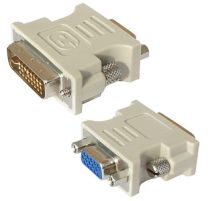
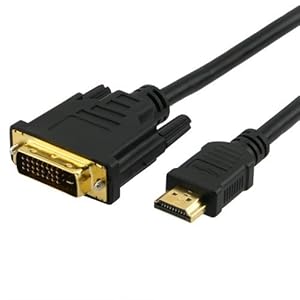
You can connect DVI to HDMI port on the new monitor with a mini-digital converter. However, cause DVI does not support audio, you must use your own cable for the audio when connecting to HDMI port. DVI makes this one of the new connectors are widely used. It was backward and forward compatible though weak in some respects. You can also connect the old monitor which only has a VGA port to the DVI port via DVI to VGA converter if analog video output supports video.

2. HDMI
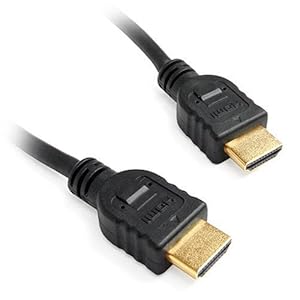
HDMI is the default cable on an HDTV, Blue-ray player, Apple TV, new computer and video card, and the multitude of other video devices. HDMI cables are easy to install, easy as plugging your USB base device. You just push and play. HDMI cables can stream digital video and audio simultaneously through the same cable.
HDMI cable port
HDMI cables support up to 1920A ~ 1200 HD video and 8 audio channels. Also, it supports HDCP encryption on some HD content up to date. A length of HDMI cable allows you to connect to computer or video device, monitor or TV, and it is a standard digital cable.

3. DISPLAYPORT
Display Port Is the new video connector, the other began to appear in many new devices, especially laptops. It was designed to replace DVI and VGA on the computer, but its use is not as much as DVI or HDMI. However, It had a lot of new computers embedded into the Mac, Dell, HP and Lenovo. Actually it is very similar to HDMI, and can stream both HD video and audio cables are the same, and can support resolutions up to ~ 1080 and 1920A 8-channel audio in a wire.
display port cable


Advantage DisplayPort supports HDCP, you can use it to protected playback HD content on Blu-ray and much more. You can also connect to an HDMI or DVI port with a converter, because the digital signal compatible. The disadvantage bit monitors and TVs include diplayPort  so you have to equip with a converter if you want to combine the laptop to the big screen.
source : http://tabloidcomputer.wordpress.com
Note: What is the difference in HDMI with DVI??

1. HDMI support audio and video signal - DVI support video signals only. However, both DVI and HDMI cables are digital interface and has the same definition of high capacity.
2. HDMI technology is actually based on the concept of DVI, and HDMI cables are fully compatible with DVI. You just need a converter to make the plugs fit each other. There are some HDMI-specific features that you lose with this method - automatic screen size conversion and universal remote control of two.

Here selection Cables Date price 11/15/11
DVI to HDMI Cable 6ft Male-Male

DVI to HDMI Cable 6ft Male-Male

Price: $2.18
Buy new more detail..
Cables Unlimited PCM-2296-06 HDMI to DVI D Cable, 6 feet

Cables Unlimited PCM-2296-06 HDMI to DVI D Cable, 6 feet

Price: $5.59
Buy new more detail..
Cables To Go 26911 DVI-D Male/Male Dual Link Digital Video Cable

Cables To Go 26911 DVI-D Male/Male Dual Link Digital Video Cable, White Connectors (2 Meter/6.56 Feet)

Price: $7.30
Buy new more detail..
Mediabridge Ultra Series - High Speed HDMI Cable with Ethernet - (6 Feet) - Category 2 Certified - Supports 3D & Audio Return Channel [Latest HDMI Version Available]

Mediabridge Ultra Series - High Speed HDMI Cable with Ethernet - (6 Feet) - Category 2 Certified - Supports 3D & Audio Return Channel [Latest HDMI Version Available]

Price: $9.99
Buy new more detail..
Eforcity HDMI Cable, 10 feet

Eforcity HDMI Cable, 10 feet

Price: $3.06
Buy new more detail..
HDMI Cable 2M (6 Feet)

Eforcity HDMI Cable, 10 feet

Price: $1.72
Buy new more detail..
Cables To Go 54002 DisplayPort Cable with Latches (3 meters)

Cables To Go 54002 DisplayPort Cable with Latches (3 meters)

Price: $11.88
Buy new more detail..

Posted by: Zein Okeh Share Everything, Updated at: Tuesday, November 15, 2011
Related Posts Plugin for WordPress, Blogger...
Powered by Blogger.