Find info about electronics prices, discounts, top deals in link, like US below.
Showing posts with label Windows 7. Show all posts

How to install android sdk ubuntu and windows


Actually I just wanted to give you a little tutorial or how to install android sdk on your pc or laptop with ubuntu os, but the same might as well install android sdk emulator on your computer or laptop pc with windows os like windows xp, windows 7, or Windows 8 as do almost the same and little disparate.

In android sdk we can use whatsapp application or WeChat on a computer with the help of this emulator android sdk installation, and if your computer is connected to the Internet then the android sdk emulator has been able to connect to the internet without any setting.
android sdk emulator ubuntu

* How to install android sdk emulator on ubuntu:


1. Install Java or OpenJDK on your ubuntu.

Open synaptic package manager or ubuntu software center and type "OpenJDK" without quotes then there will be available in accordance with the OpenJDK version of ubuntu 10.04 ubuntu instance it would appear OpenJDK 6 right-click and mark for install. Wait until the process is complete. To install openjdk-7 see here
In terminal :
#sudo apt-get install openjdk-6-jre

2. Download the Android SDK emulator here.

3. Extract the Android SDK has been downloaded into documents or anywhere up as needed :).

4. Open terminal by pressing CTRL + ALT + T or click Applications -> Accessories -> Terminal. Typing sudo su and enter your password.

5. Navigate your terminal to the android sdk folder. For example, if the Android SDK folder located in Documents then follow these steps:

  • cd Documents --> cd android-sdk-linux -- > cd tools --> ./android
  • So do not want typing like the above do as follows:

    - Open a terminal its way as the No. 4 typing "gedit ~ /. Bashrc" without the quotes and enter the text below at the very top and then save.
  • #AndroidDev PATH export PATH=${PATH}:/home/???/Documents/android-sdk-linux/tools export PATH=${PATH}:/home/???/Documents/android-sdk-linux/platform-tools
note:the name of the red "/ home /??? / Documents / android-sdk-linux / tools" and that the second is the folder where I store the android sdk. Adjust to the folder where you saved.- Still diteminal the following command "gedit / etc/udev/rules.d/51-android.rules" without quotes and input the text below ".

SUBSYSTEM=="usb", ATTRS{idVendor}=="0bb4", MODE="0666"

SUBSYSTEM=="usb", ATTRS{idVendor}=="0502", MODE="0666"

SUBSYSTEM=="usb", ATTRS{idVendor}=="12d1", MODE="0666"

SUBSYSTEM=="usb", ATTRS{idVendor}=="1004", MODE="0666"

SUBSYSTEM=="usb", ATTRS{idVendor}=="22b8", MODE="0666"

SUBSYSTEM=="usb", ATTRS{idVendor}=="04e8", MODE="0666"

SUBSYSTEM=="usb", ATTRS{idVendor}=="0fce", MODE="0666"

SUBSYSTEM=="usb", ATTRS{idVendor}=="0489", MODE="0666"

SUBSYSTEM=="usb", ATTRS{idVendor}=="18d1", SYMLINK+="android_adb", MODE="0666"

SUBSYSTEM=="usb", ATTRS{idVendor}=="04e8", MODE="0666", GROUP="plugdev"

To install the android sdk at the root can be viewed of the source ubuntu comunity here.

Then save and reboot or restart your laptop or computer. So that when you open the android sdk does not necessarily have to enter the android sdk folder on terminal. simply by opening a terminal and sudo password and then android sdk android in laptop or pc you'll leave.

6. Open a terminal and typing sudo ubuntu android then enter your password.

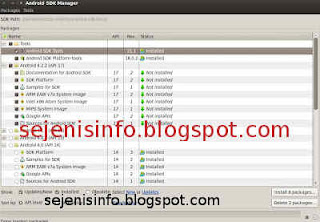
7. After the android SDK emulator appears and then select the check tools and android files that get installed like in the picture below.
android avd emulator ubuntu

In the picture above I did install android 4.2 version and you can choose the version that will be installed android as android ICS, android honeycomb etc as you wish. At the bottom of the Extras folder with writing a check Android support libraries, Google play service, Google usb driver and so adjust it with the needs.

8. Click the install packages and licenses accept check, wait a while until installation is complete.

9. After install android sdk on PC or laptop is complete then click the Tools button located at the top left after the packages.

10. After the new window appears select the window or click the Manage button AVDS ... and click the New button on the right existing, well here you can choose your favorite android version there is a 10 inch size to a small size, select the size of the 7-inch or 5 inch that if the computer or laptop has a less specs computer so you are not too hang up or heavy and lag.

11. A new window will appear when the button is clicked and a new Insert your name free android for example name is androidku, android select your choice according to size preference. If you want to change the size of the internal memory replace it from 200 to 512 for example, and the contents of sd card to 1024 = 1GB and click OK.

12. If it is then in view avd there will be a new menu that has been created is androidku. Click start to open its android os android will appear according to your choice.

* To install the Android SDK on windows is the same way.


1. Download and Install the java application here.

2. Android Download for windows here.

3. Install android sdk on windows and if it is open android sdk installed and did his manner as above at the start of No. 7.

Video how to install android sdk emulator on pc or laptop


Posted by: Zein Okeh Share Everything, Updated at: Monday, May 06, 2013

How to know windows version installed


Computer or laptop which already windows installed either windows xp, windows 7 or windows 8, perhaps we do not know which version of Windows that is used on our pc. There are many versions of windows like windows xp service pack 1, windows xp sp2 and also on windows xp sp3 there are several other versions as windows xp for gaming, windows xp media center, windows xp home edition, or windows with x32 or x64 bit etc..

If I could mention one by one until dawn :). Our PC has installed the windows being installed by others of course we do not know the most likely version is used, the following well below I will give a little info about how to know which version of Windows that is used in your computer or laptop.

How to know the version of windows on windows xp and windows 7:

In windows to know which version of Windows that is used almost same way, but not nearly but thats same way.

1. If its on the desktop or on the main screen there is icon my computer, just right click mouse on my computer icon and click properties that its.

2. If the My Computer icon on the main screen or on the desktop it does not exist then the way we use open windows explorer then right click the mouse and then click properties.
See the example image below.

how to know windows version


Display system properties windows xp deluxe version.
system properties windows


3. If you want to see the whole system including the use dxdiag version used then use the following:
- Click start and click run.
run button windows


- Typing "dxdiag" without quotes, then enter will be out the display as shown below.
dxdiag windows xp deluxe


For his appearance may vary slightly depending on the theme used.

How to know windows 8 version:
For an extra little info for those who may be new including my first time on using windows 8, may be will confused to looking for run and to run some command like cmd, dxdiag etc..Here a little info to find it:

1. Open windows explorer.
2. Right click mouse button and select Properties.

How to enter to run in Windows 8:

1. Move the mouse to the right monitor, will be out a menu.
windows 8 menu


2. Select the top menu the search menu and typing cmd.
windows 8 search command run dxdiag

If you want to open cmd as adminitrator just right click your on cmd icon and see on your screen below that will appear the options.


Posted by: Zein Okeh Share Everything, Updated at: Sunday, May 05, 2013

Windows 8 and windows 7 dual boot system


Around a couple of days ago my sister bought a samsung notebook with AMD A6-4400M APU Radeon (tm) HD graphics 2.70 GHz and 2 GB ram. That's just the information I used to create a dual boot windows 7 and windows 8 on the samsung laptop.

And before that I had made a post on how to dual boot windows 8 and windows xp on the pc, and dual boot or triple boot between windows, ubuntu linux and android. Whatever can be done on a computer or laptop that we have provided a laptop or pc we already meet the criteria or have the specs required for an operating system.

How to install dual boot windows 7 and windows 8 there are some things that need attention or need her to know some of the steps that must be done first. In samsung Laptop AMD A6-4400M vision the first thing change bios settings by clicking the F2 key when the laptop first time it runs, and then select the first boot the system it is cdrom first boot. Usually there are cdrom his name but I forgot the name of cd-romnya, because now the laptop was taken by my sister :).
dual boot windows 7 and windows 8

The first step to dual boot windows 7 and windows 8 are:


1. Make a partition on the hard drive, because its a new laptop so I created three partitions ie Drive C or the first partition is 100 GBdrive D or a second partition around 50GB and for the rest Drive E for storage of data such as music files, video etc..
For the hard drive is already partitioned or already installed windows to make sure the partition is windows 8 windows 7 minimal  15G.
To create partition with  partition wizard tool see the video below :
2. Once the partition is created it is time to install the windows. First time that must be installed on your pc or laptop is windows 7, but it is okay if you want to install Windows 8 first and write cd key or serial number windows 7 to a paper for later needed during installation, enter into the windows 7 cd into cd-rom then restart your PC or laptop and then on the computer screen or laptop turns while press the F11 key to bring up the boot options of the first instance for the first boot drive and a second boot to cd-rom, now that we chose is the second boot is to boot to cdrom, but on some computers or laptops are different settings so if F11 can not work try by pressing F9 or F10 or F12. Or if the cd rom on your computer or laptop is damaged then it can do the installation of windows 7 on usb drive, to make a boot usb drive windows 7 can be found here.
3. If you've booted into the cd-rom then install windows 7 will run immediately and follow the steps according to instructions there. But to partition or select the appropriate partition we created earlier as the partition or drive C then select the partition, my advice would select the first partition or drive C to perform the installation windows 7, when the first partition or drive C: is for megabytes eg 100 MB or 200 MB and more, then select Drive D: a magnitude of more than 15 GB, the partition size of 100 or 200 mb and size assortment but I know size is not more than 500 MB is for the system partition or boot partition windows reverse the will be used for booting.
4. Once Windows 7 is installed on your computer or laptop, then the next ketahap.
5. Insert the CD or usb windows 8 restart your laptop or computer, as usual at the start screen appears click or press the F9 can boot, F10, F11 or F12 depending on your PC settings.
6. Once the PC or laptop is booting to the cdrom windows 8 and then select the appropriate languange and select the U.S. keyboard click next and install, well for its partition select the partition you created for Windows 8, for example Windows 7 installed on Drive C then windows 8 in installed on drive D. click next and the installation will begin just follow the steps in accordance with the instructions given there.
7. Once Windows 8 is installed it after restarting the computer or laptop then there are two choices aka boot the windows 7 and windows 8.
8. Good luck.

If you still get confused comments below this post. Thank you.


Posted by: Zein Okeh Share Everything, Updated at: Monday, February 18, 2013

Script Defender 1.03 to execute scripting files


AnalogX Script Defender or script Defender is a tool to counter script that can cause the operating system to be corrupted.
This script defender can be used for windows 7, windows xp, windows vista, windows server and more.
There are files that are likely to spread the virus through the script we do not know its form. Script  defender 1.03 can prevent execute the virus script into our computer.

Many ways to block/execute the spread of the virus can occur at any time, such as using antivirus that can be optimized, but usually there is a script virus spreader that can not be blocked by the antivirus, then you need to install AnalogX script defender on your computer, it is used sparingly use the manual. That way each script virus that resides on your computer can be blocked with this free software.
analogx script defender 1.03
image source : Blog Bontang

How can we do to installing the software just click the downloaded file is sdefeni.exe. After the installation is complete then run the script defender 1.03, you can go to the start menu.
If the program is on, then you perform the initial configuration, the initialization process useful programs installed intercepts  extension file.

Script can be blocked is files like extensions files ie VBS, VBE, JS, JSE, HTA, WSF, WSH, SHS and SHB.

In addition to the above files, you can perform additional settings or files that you want the execution of its existence by the way, include the type of extension will be blocked through a list of file extensions to intercept, if all the settings are in accordance with the wishes and all the file extensions are already in your list 've been able to run more by clicking the install button intercepts. If the AnalogX script defender will displays a pop-up and gives a message that the file extension successfully included in the list. Then click the OK button to remove the message and click done to solve it.

Then you do your job as usual, and if something happens, the script AnalogX 1:03 defender to give a message, it means there is contact or a script that will run on the list. But you can choose, if you want to run the script then you simply by pressing the execute button or if you do not want to run the script click the abort button. If the script is apparently the script file disguised as a secure script, there will be a suspension or you quit while your computer and script defender would give the message to execute or abort.
You can download Analogx Script Defender 1.03 here

Reference : Blog Bontang

Posted by: Zein Okeh Share Everything, Updated at: Friday, October 19, 2012

AVG free antivirus 2013 Download for windows xp


Free AVG Antivirus 2013 for windows xp, which can be downloaded for free on the official website. AVG anti-virus is very powerful to eradicate all viruses on laptops and computers, in addition to avast and avira, avg anti-virus is also very popular and very helpful in his role.

AVG free anti virus 2013 with the latest security features and a new look, for those who never use windows 8 (retro) may already be familiar with the look of it but those who have never been this will be a new thing. Menus are contained in this new look will be clearly displayed, in terms of appearance taken from the display windows 8 but with more soft and more simple. Not only the look of the new AVG free anti-virus 2013 is accompanied by a wide range of changes and improvements to increase the performance of previous versions, including the following:
AVG free antivirus 2013 download


1. Will be lighter in running AVG, because the memory usage on windows that have been reduced.
2. Security increased detection and better than 2012 version.
3. Improved detection of viruses with services or cloud-based file reputation technology.
4. Notifications more, for a low computer or less comfortable for the notification, then we could be set to be disabled. To do this go to the menu option> advanced setting.

Apart from the four features above, avg free antivirus is also equipped with many other features, such as WIFI Guard and modules Do not track, WIFI Guard is to help computer users to avoid wifi access points in the form of hackers, who can alert the user when the computer will have access to the network. While Do not track will give you information about advertising, web analytics and social buttons that appear on the Internet which provides options to block or be monitored by the script.

Features that are not developed like AVG Link scanner been replaced by AVG Secure Search, so when there is a choice to install avg antivirus search default to be installed security toolbar in your web browser. To ensure it is not installed before you install you can chooce your curent option, and another festures might not want to install you have to select each installation on avg antivirus is the main component.

The operating system can be used fatherly to install AVG Antivirus Free 2013 is Windows XP, Vista, 7 and Windows 8 (available also AVG Free Antivirus for Linux / FreeBSD). When downloaded from the link given main AVG website, will be directed to the download site CNET.com, which only provides online (web) installer is 4 MB, so we have to be online to be able to install this antivirus. Available free trial AVG Internet security 2013.
To Download Free AVG antivirus 2013 you can follow here

Reference : Blog Bontang

Posted by: Zein Okeh Share Everything, Updated at: Wednesday, October 17, 2012

Ways to securing your computer system from hacker


There are several factors that can lead to compromised securing of computer systems, among which the development of a virus that will cause the computer system to be failure.
And with the development of technology the world now use the computer as a communication to online banking, social networking and online shopping. For it is the easier of the hackers and crackers as spammers can attack anytime on your computer system.

Hackers can stolen our personal data such as emails and other important data. For that we need a few countermeasures in order to keep your computer system safe from hackers and crackers. Here are simple steps that you can do on your computer system.
Secure Computer
image source : Flickr.com
1. Important data such as personal information had to be backed up at any moment and store it separately from the computer you normally use to open the email, social network and online shopping.

2. For computers that are often used for internet browsing software to install a good firewall, so viruses, worms, malware, trojans and adware will be difficult to penetrate the wall.

3. Using the browser, you should always take a look at whether they are in a state of optimum safety as email settings to keep spammers.

4. Operating systems, software and web browser you use should be kept up to date, frequent updates to the third circuit, the point to make them thicker than hacker attacks etc.. For users of Windows OS update by visiting windowsupdate.microsoft.com and for users of office visit officeupdate.microsoft.com latest patches and updates from it.

5. Boot disk is important, then you create a boot disk on your computer using a usb drive, so if there is damage to your computer operating system you just open the first with a boot disk.

6. Install anti-virus and setting the automatic updates so that updates to anti-virus will always receive the new version.

7. Be careful to incoming email and you do not know, because if we open the email could happen that email is a virus spreader.

8. There are some programs of unknown origin, the program can be a funny story or a joke, It can contain a Trojan horse in it and if you spread to multiple computers like kekomuter friend trojan horse virus then it will attack the computer in question.

9. Always turn off your computer when not in use, so your computer will be free from attacks by hackers, because hackers now can not penetrate the dead computer.

10. File name extension must remain disabled, this is usually the windows operating system by default is set to hide file extensions.

Posted by: Zein Okeh Share Everything, Updated at: Thursday, September 27, 2012
Related Posts Plugin for WordPress, Blogger...
Powered by Blogger.